
If you host your documentation on Mintlify, you already know how clean and polished the experience is. Their native AI assistant is a nice feature—visitors can ask questions and get answers grounded in your docs pages, right there on the page.
But there’s a catch: the pricing.
Mintlify’s AI assistant can cost up to $0.50 per message. And since your docs are public, you have absolutely zero control over who’s asking questions or how many they send. On top of that, their pricing model locks you into a fixed tier—you pay for a block of messages whether you use them all or not. For documentation sites with decent traffic, the bill can quickly climb over €1,000/month.
That’s a steep price for a chatbot that only reads your docs pages.
There’s a better way. One that gives you the same quality (or better), lets you add more knowledge sources, works on any website (not just your docs), and starts at roughly 2 cents per query—making it up to 25 times cheaper than Mintlify’s native AI.
That alternative is Lookio.
Where Mintlify’s AI assistant falls short
Let’s be clear: Mintlify is an excellent documentation platform. But their native AI assistant has three major limitations that become painful as you scale.
1. The price doesn’t scale well
At the very start, the cost per message can reach up to $0.50. And these are public visitors—you can’t predict volume or limit usage. Mintlify forces you to commit to a fixed monthly pricing tier for AI messages. You’ll pay for the full tier even if you don’t use it all—and if you hit your limit, you are pushed to the next tier automatically.
Here is what Mintlify’s AI assistant actually costs as you scale:
- 0 to 250 messages: Free (Fine for testing, but quickly exceeded)
- Up to 1,500 messages: $300/month
- Up to 5,000 messages: $1,045/month
- Up to 15,000 messages: $2,802/month
- Up to 25,000 messages: $4,207/month
- Up to 50,000 messages: $7,462/month
- 50,001+ messages: $10,465/month
For a documentation site with high traffic, you are looking at paying over $125,000 a year just for a docs chatbot.
2. Your knowledge is locked to your docs pages
Mintlify’s AI can only answer based on pages hosted on Mintlify. That sounds fine at first—until you realize your product knowledge lives in more places than just your docs:
- Product blog articles that explain use cases and best practices.
- Onboarding PDFs and guides that aren’t part of the public docs.
- Internal sales decks or comparison sheets you’d want a public chatbot to reference.
- Changelog entries or feature announcements that live elsewhere.
With Mintlify, you can’t add any of this. Your chatbot is limited to whatever pages exist on your Mintlify-hosted docs. Nothing more.
3. The widget is locked to your docs site
The AI assistant only lives on your Mintlify docs. You cannot embed it on your main marketing website, inside your SaaS app, or on a landing page. If a prospect is browsing your homepage and has a question about your product, the Mintlify chatbot can’t help—because it simply doesn’t exist outside of your docs domain.
Why Lookio is the smarter alternative
Lookio is an AI knowledge retrieval platform that lets you build intelligent assistants on top of any knowledge base and deploy them anywhere—including as a live chatbot widget on your website.
Here’s how it directly solves each of Mintlify’s limitations:
Pay-as-you-go pricing that actually scales
Lookio uses a credit-based, pay-as-you-go model. You buy credit packs, and they never expire. No tiers, no commitments, no paying for messages you don’t use.
The cost per query depends on the query mode you choose and the credit pack you purchase.
1. Choose your Mode (per query)
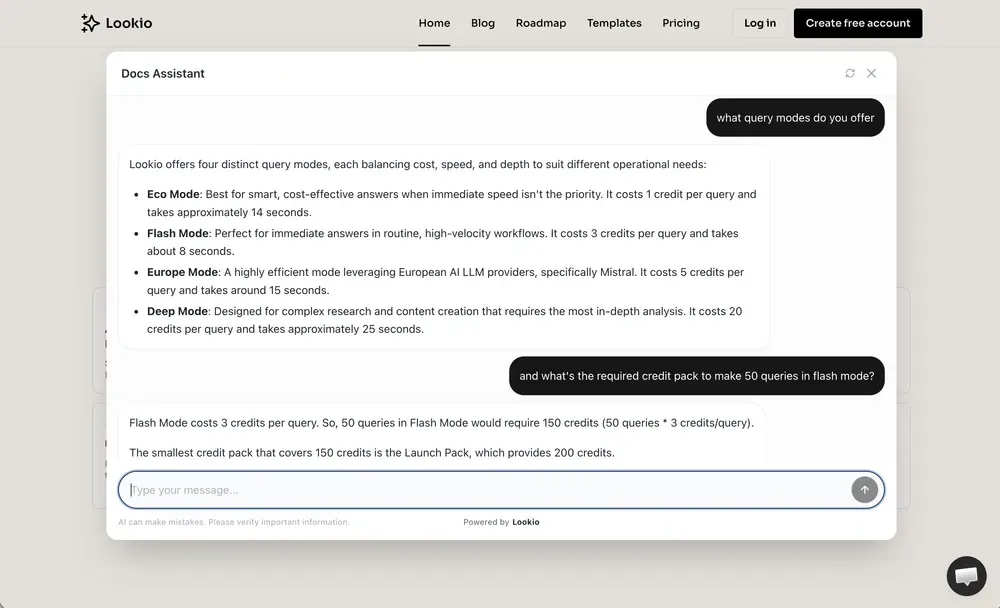
- Eco Mode (1 credit): Smart, cost-effective answers when speed isn’t the top priority (~14s).
- Flash Mode (3 credits): Immediate answers for real-time chatbots (~8s). (Recommended for widgets).
- Deep Mode (20 credits): Maximum intelligence for complex research.
2. Choose your Pack (per credit)
The price per credit drops as you scale:
- Orbit Pack: 1,000 credits for €24 (2.4¢ / credit)
- Stellar Pack: 10,000 credits for €180 (1.8¢ / credit)
- Galactic Pack: 50,000 credits for €750 (1.5¢ / credit)
The Real Savings: Mintlify vs Lookio
When you combine these, the savings are massive. If you use Flash mode with a standard pack, your cost is roughly 4.5¢ to 7¢ per query. If you use Eco mode, it drops to as low as 1.5¢.
Here is how that compares to Mintlify across three volume scenarios:
| Scenario (Monthly Volume) | Mintlify AI Tier | Lookio Flash (3 credits) | Lookio Eco (1 credit) |
|---|---|---|---|
| Growing (750-1,500 queries) | $300/month | ~$55 | ~$18 |
| Scaling (3,000-5,000 queries) | $1,045/month | ~$160 | ~$55 |
| Enterprise (35,000-50,000 queries) | $7,462/month | ~$1,575 | ~$525 |
(Note: Calculations assume volume at the lower end of the fixed Mintlify tiers. Lookio costs are calculated based on the most appropriate credit pack for each volume.)
While Lookio Flash mode is already 5x to 6x cheaper than Mintlify across the board, switching to Eco mode can push those savings as high as 15x to 20x—because you only pay for exactly what you use, rather than committing to a massive pre-paid tier.
Lookio achieves this quality by running multiple background queries to break down complex questions into smaller chunks—earning a top score of 37/40 on the n8n Arena challenge. You get better RAG technology, for a fraction of the cost.
Any knowledge source, not just docs pages
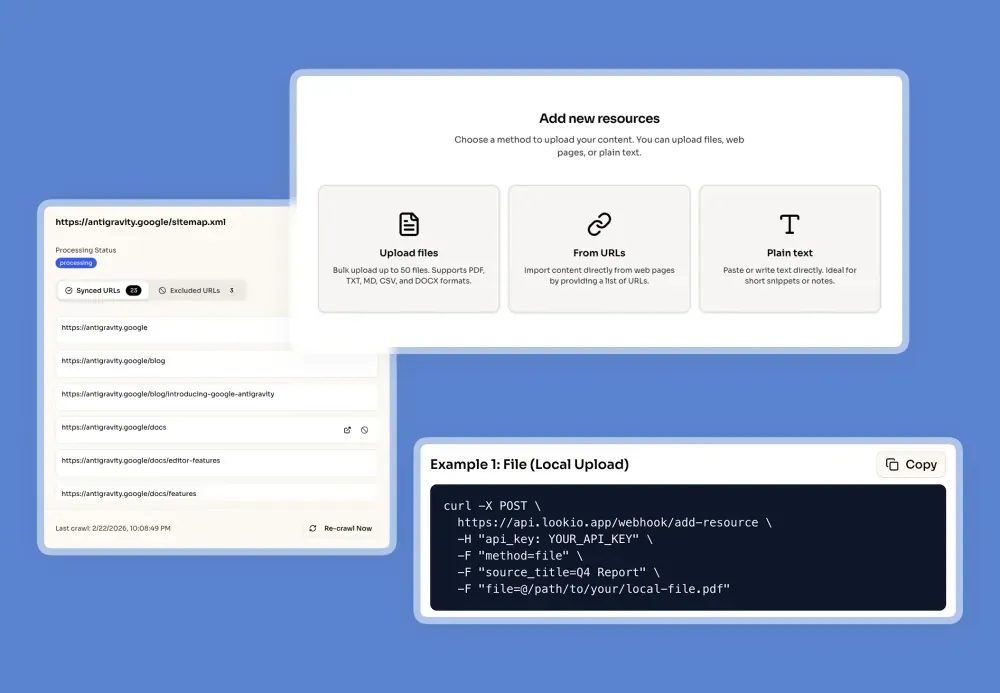
With Lookio, you upload any type of knowledge—not just docs pages:
- PDFs and documents (product guides, onboarding materials, compliance docs)
- Individual URLs (blog posts, changelog entries, case studies)
- Plain text (sales scripts, internal FAQ answers, competitor comparisons)
- Full sitemaps (sync your entire Mintlify docs automatically via
yoursite.com/sitemap.xml)
This is key: You can sync your existing Mintlify docs as a sitemap resource in Lookio, and then add more knowledge on top (PDFs, blog URLs, internal docs). To give you full control at scale, Lookio allows you to use Exclusion RegEx to precisely target only the pages you want—for example, to only include
/v2/docs or exclude non-English folders to avoid redundant processing. Don’t know RegEx? Our built-in AI helper writes those expressions for you based on your simple instructions.
The sitemap sync is automatic. Whenever you add, update, or remove pages from your docs, Lookio keeps the knowledge base up-to-date without any manual intervention.
Deploy the widget anywhere
Lookio widgets aren’t locked to one platform. Once you create and configure a widget in Lookio, you get a lightweight six-line script that you can paste into:
- Your main marketing website
- Your SaaS application (in-app help)
- Your documentation site (including Mintlify-hosted docs)
- A landing page for a specific product or feature
- Any domain you control
One assistant, one knowledge base, deployed wherever your users are.
How to set it up (5 minutes)
1. Import your Mintlify docs into Lookio
Create a free Lookio account—you get 100 free credits to start.
Go to Resources → Sitemaps and paste your Mintlify docs sitemap URL (typically docs.yourcompany.com/sitemap.xml). Lookio will crawl all your pages and keep them synced automatically.
For advanced control, you can use Exclusion RegEx to exclude specific patterns or folders (like avoiding multiple language versions). Our AI RegEx Helper makes this effortless by writing the expressions for you—you just tell it what you want to exclude in plain English.
Want to add extra knowledge? Upload PDFs, paste URLs of your blog articles, or add text that isn’t part of your public docs. Your assistant can access all of it.
2. Create an assistant
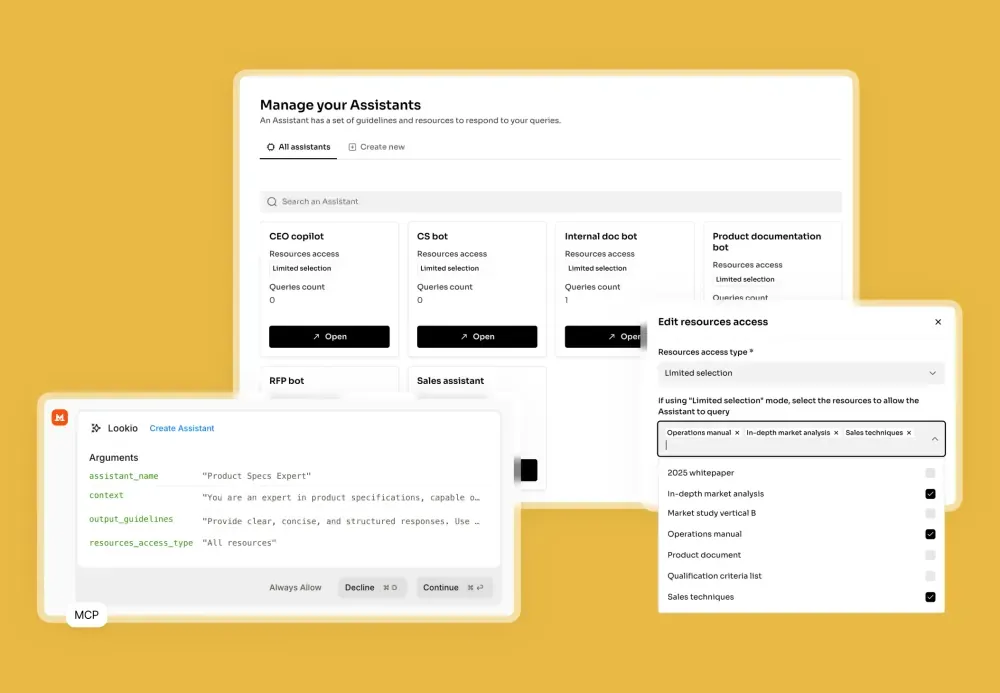
Go to Assistants and create a new one. You’ll configure:
-
Context: Define the assistant’s role and rules. For example: “You are a helpful product assistant for [Company Name]. Answer questions based on the documentation and resources provided. Be concise, friendly, and include links to relevant pages when possible.”
-
Output guidelines: Set the language, format, and tone (e.g., “Always respond in English. Use short paragraphs and bullet points where appropriate.”).
-
Resource access: Select all your imported resources, or pick only specific ones.
Pro tip: Use the context field to add persistent behaviors. For instance, instruct the assistant to recommend booking a demo with your sales team whenever a visitor seems highly interested in a specific feature—and include the scheduling link so the assistant can share it directly. This turns your docs chatbot into a lead generation tool.
3. Configure and customize your widget
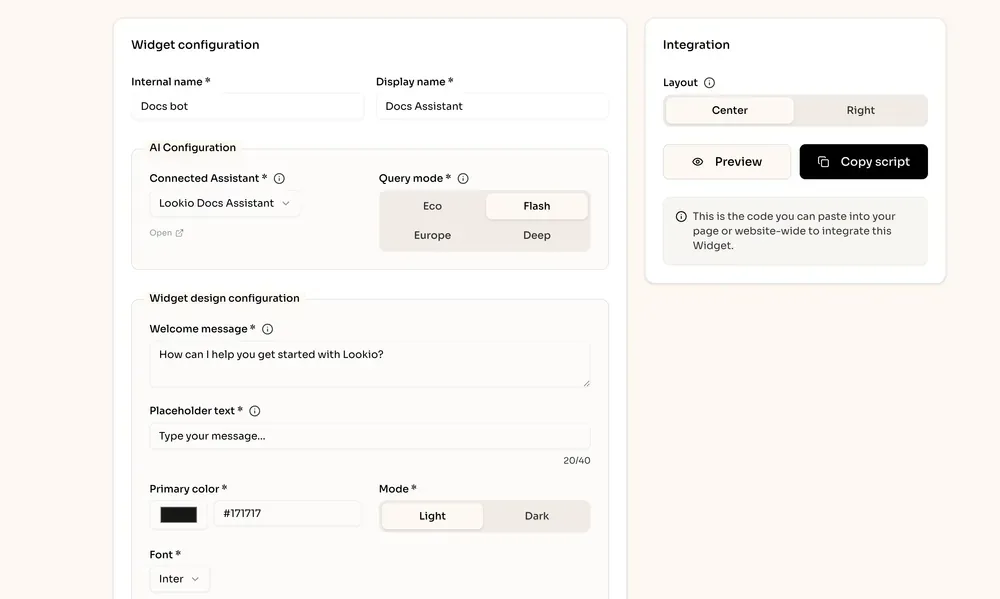
Head to Widgets and create a new one. Connect it to your assistant, pick Flash mode for speed, and customize:
- Welcome message and placeholder text
- Accent color to match your brand
- Light or dark theme
- Font to match your design system
- Allowed domains (so the widget only works on your sites)
Choose one of two polished layouts:
- Centered: A bottom-center pill with a smooth animation that opens into a centered modal conversation.
- Bottom-right: A classic chat bubble that opens a full-height side panel on the right.
4. Preview, copy, and replace Mintlify’s AI
Preview the widget inside Lookio to test the experience. When you’re happy, click Copy script and paste the six-line snippet into your website’s custom code:
<script
  src="https://widget.lookio.app/widget.js"
  data-widget-id="YOUR_WIDGET_ID"
  data-position="bottom-right"
  data-theme="light"
  defer>
</script>
That’s it. Your new, cheaper, more flexible AI assistant is live.
What you gain by switching
Beyond the massive cost savings, Lookio gives you capabilities that Mintlify’s native AI simply doesn’t offer:
- Conversation analytics: Access every conversation directly in the platform to see what visitors are asking. Track volume, response patterns, and identify the topics your prospects care about most.
- API access: Query the same assistant programmatically via Lookio’s API to power automations, internal tools, or support bots in n8n.
- MCP connector: Connect your assistant to agentic tools like Claude Code, Mistral, or n8n so AI agents can autonomously query your knowledge base.
- Multiple assistants: Create different assistants for different use cases—one for docs support, one for sales enablement, one for internal knowledge—all running on overlapping or distinct resources.
Full comparison
| Feature | Lookio | Mintlify AI |
|---|---|---|
| Cost per query | ~2¢ (Flash) | Up to 50¢ |
| Pricing model | Pay-as-you-go, credits never expire | Fixed tiers, pay even if unused |
| Monthly cost (3K queries) | ~$60 | ~$1,500 |
| Knowledge sources | PDFs, URLs, sitemaps, text | Docs pages only |
| Auto-sync docs | ✅ via sitemap | ✅ (native) |
| Add extra knowledge | ✅ | ❌ |
| Deploy anywhere | ✅ any website or app | ❌ docs site only |
| Widget customization | Colors, fonts, 2 layouts, themes | Limited |
| Conversation analytics | ✅ | ❌ |
| API access | ✅ | ❌ |
| MCP connector | ✅ | ❌ |
The bottom line
Mintlify is a great docs platform—but their native AI assistant is overpriced, knowledge-limited, and locked to a single domain.
Lookio gives you the same quality of documentation AI (built on production-grade RAG) at a fraction of the cost, with the flexibility to add any knowledge source, deploy anywhere, and integrate into your broader workflows.
Create a free Lookio account and get 100 free credits. Sync your Mintlify docs, set up a widget, and see the difference for yourself.