
Over the past couple of years, and especially in the last months, SEO was announced to slowly die as AI is taking over the search landscape. But what we actually see is that SEO actually follows similar codes to SEO. If you rank on search engines, then AI tools that call search engines as a tool will find your content and feature you in the answers.
At the same time, the way companies produce content has been transformed, as more and more content on the internet comes directly from AI: 74% of all new web content includes AI content, according to a study by Ahrefs.
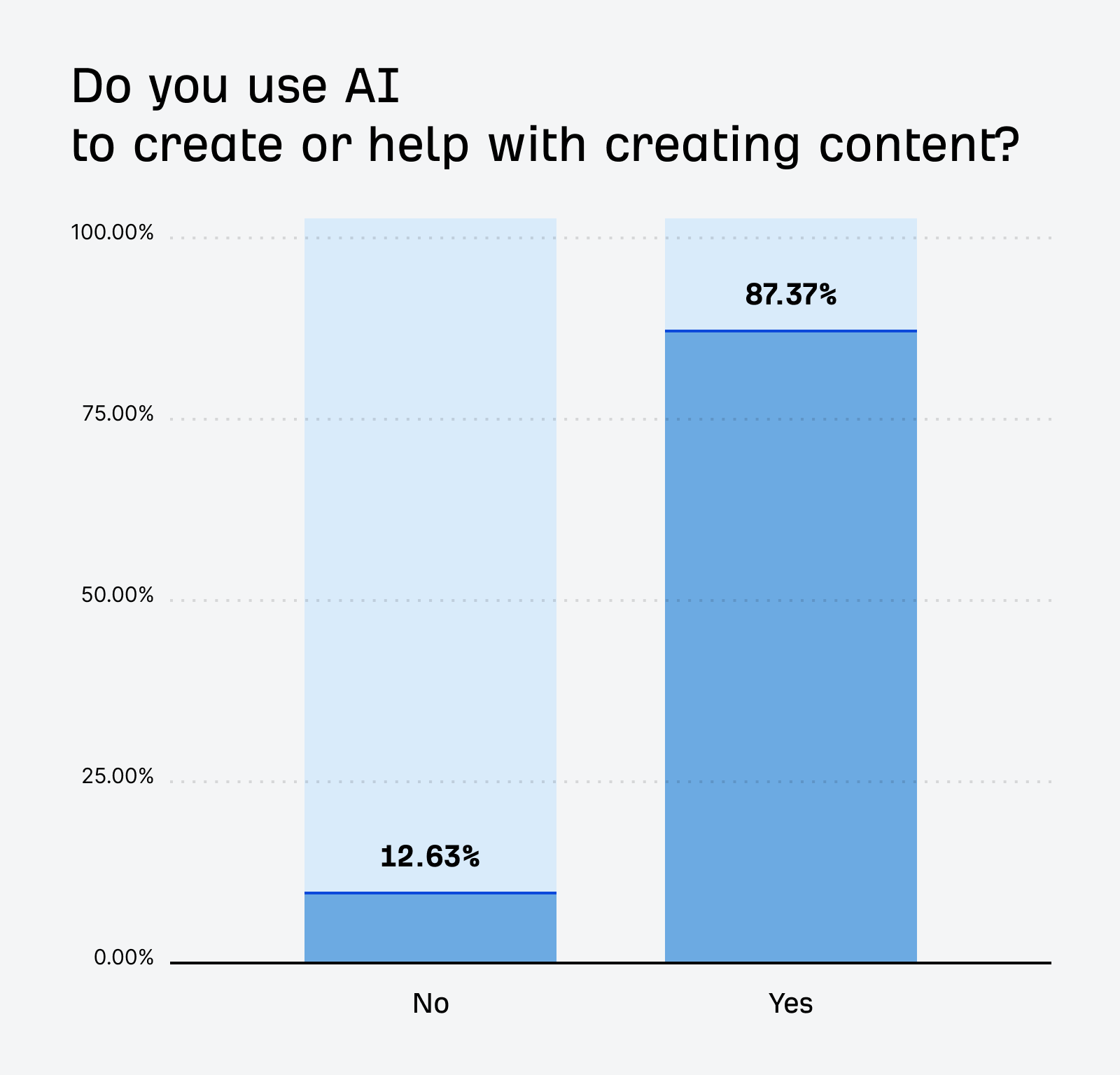
AI can for sure accelerate the publication of content, but it doesn’t really work when it’s done without a clear method. Ahrefs’ studies conclude that purely AI-generated content rarely performs well.
The recipe to perform actually hasn’t really changed. What is being valued are unique insights, expertise, and opinions, which are all elements that the generic knowledge of LLMs doesn’t allow you to achieve because everyone uses the same models. A proof of that is how much people are going back to Reddit to actually read what humans think about any topic.
And the good news is that every company actually has unique insights. They have data that they can produce based on their product usage, their surveys, etc. They also have unique insights from their commercial teams, talking to hundreds of prospects. They have unique insights as they are directly working within their industry on improving their product, testing things, iterating, and conducting research.
The main challenge becomes surfacing this unique knowledge at scale to embed it into the content you publish, to reach both interesting volumes to have a chance to compete, and meet the new standards of quality for SEO content.
I’ve experienced many approaches over the past 5 years and doubled down when LLMs were made available at the end of 2022.
Good news: here’s the solution and a detailed guide on how to implement it.
I’ve built Lookio as my dream platform to scale the generation of high-quality and sourced content. It allows you to create highly reliable AI Assistants on top of your resources, and then query those via API within content generation workflows.
3 steps to implement a robust system:
- Consolidating your knowledge base
- Configuring Lookio Assistants
- Automating content creation
Consolidating your knowledge base
You need to prepare all the useful insights, data, and knowledge to leverage when creating content.
Here are some key sources you can consider:
- Official documentation on your topic (e.g. the Greenhouse Gas Protocol if you’re in the carbon accounting industry — it’s a set of 100+ pages detailing all methods to calculate emissions for businesses).
- Internal expertise: everything that your teams have documented about your industry and topic (e.g. if you’re in the healthcare industry, compile all research that has been done comparing all providers, pros and cons, etc).
- Quotes from your best customers: you’ll definitely want to feature those in your articles, to give them a human touch and communicate about your solution through the voice of customers who get value from it.
- Insights from your sales teams: they’re constantly in touch with your core audience and meet your prospects, which gives them very unique perspectives on where the market is heading, what is important for this industry, and which trends are evolving.
Consolidate them all in well-structured documents so they are easy to find and easy to import into Lookio, which is the next step.
Configuring Lookio Assistants
Now that we’ve secured putting together all the relevant resources to leverage when creating content, it is time to import them into Lookio.
If you haven’t already, create a free Lookio account at lookio.app, set up a workspace, and go into the resources page.
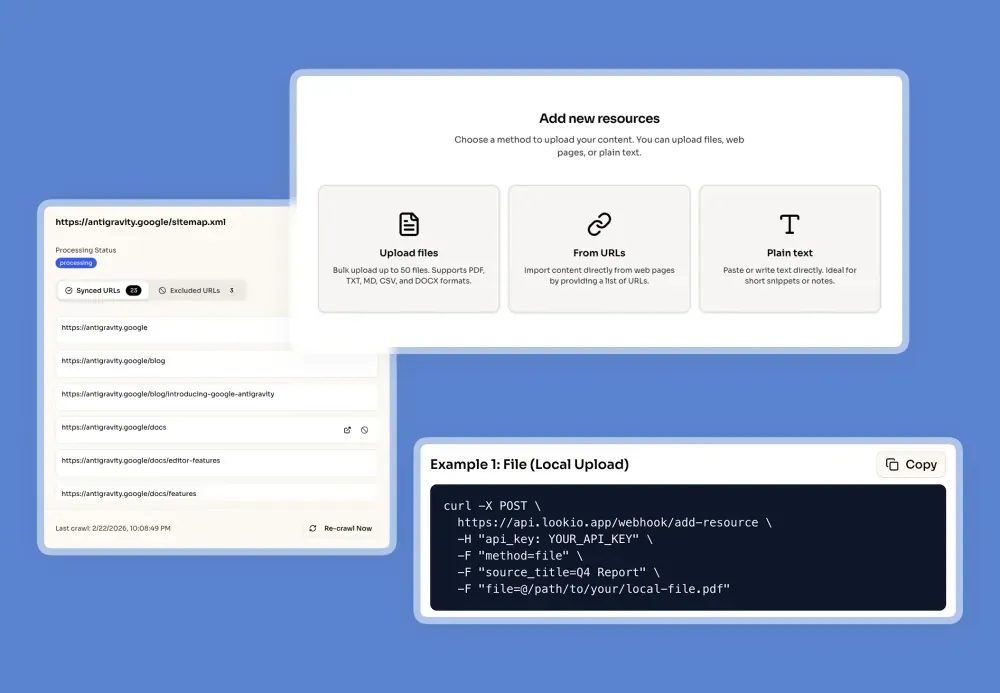
This is where you will be able to import all the relevant resources that you have prepared. You can either import them as PDFs, as TXT files, or as plain text to copy and paste directly into the platform. Give each resource a very clear name, and we also recommend adding a URL, which will later allow the Assistants to refer to the sources they leveraged to provide answers.
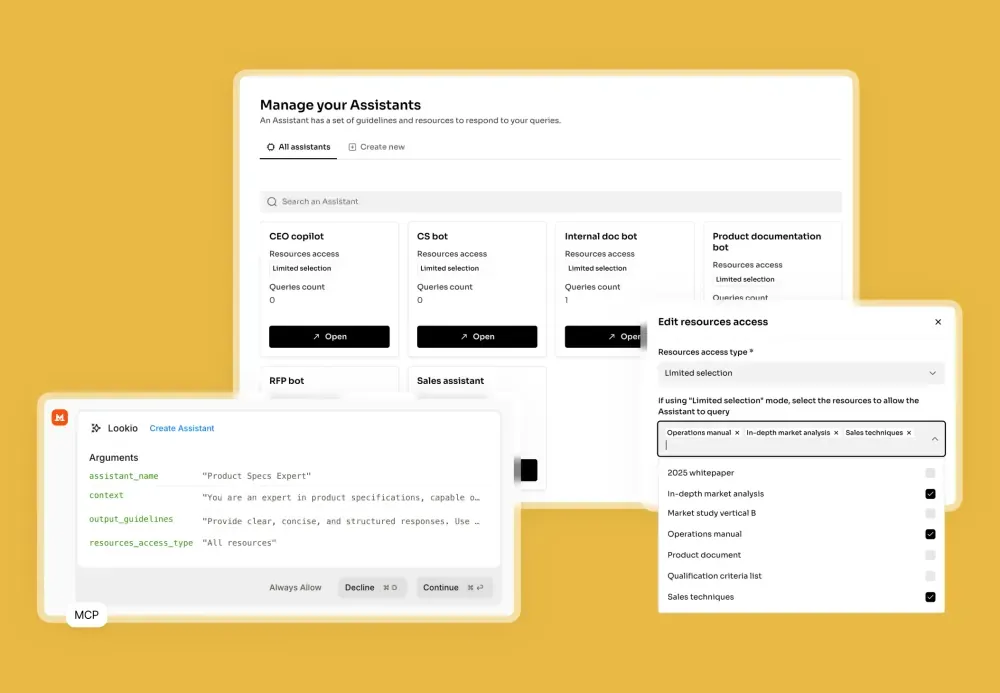
Once you are done uploading your resources, open the Assistants page to create your first Assistant. Give it a clear name and write down a few words about its context. You can mention your industry, tell that it will work on helping with content creation, and you can also define output guidelines — here you can specify the exact language (for example, British English) and also set the tone or response format (for example, if you’re looking for concise or detailed answers). Lastly, you can decide if the Assistant can access all uploaded resources or only a selection of them.
The last step to configure Lookio is to move to the API key page and create a new API key, which will be crucial in the next step to integrate Lookio into your automation tools.
Automating content creation
Our smart Assistant is now ready to be integrated within a workflow that will help you automate content creation.
You can use your favorite automation tool here. If you don’t already have one, we recommend Zapier if you are beginning with automation, Make.com if you have already set up some automations, and n8n if you are ready to go a bit more technical and create more advanced workflows.
→ Read our practical guide to the top 8 AI automations for SEO.
Here’s how you can query your Lookio Assistant within these tools.
Lookio is an API-first solution. The platform you access on Lookio.app is the place where you configure your workspace, manage your resources, and create Assistants. To query these Assistants, you can of course test them manually directly via our platform, but the end goal is to query them via API.
NB: An API (Application Programming Interface) is a way for different software systems to communicate with each other, and an API call is simply a request made by one system to access or send data through that interface.
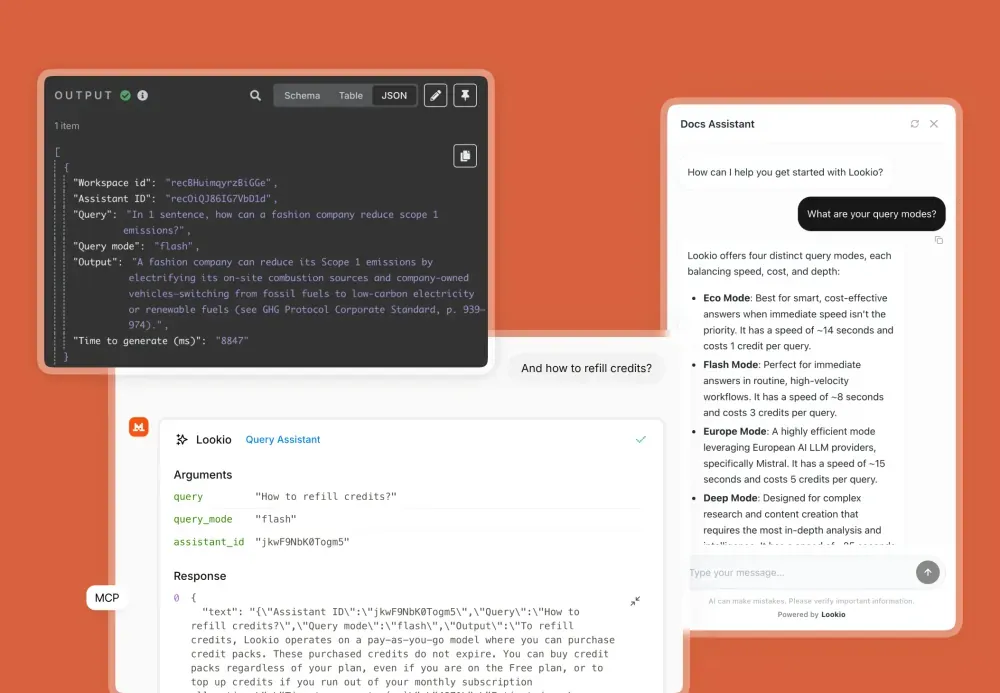
Calling an API is a common step within workflows using the automation tools mentioned above. Find the dedicated module (or “node” if you’re using n8n), and configure it to make the following request to Lookio’s API:
curl -X POST \
https://api.lookio.app/v1/query \
-H "Content-Type: application/json" \
-H "api_key: YOUR_API_KEY" \
-d '{
"query": "YOUR_QUERY_HERE",
"assistant_id": "YOUR_ASSISTANT_ID",
"query_mode": "deep"
}'
Do feel free to look into the tool’s documentation if you need help, or copy the details shared above into an AI tool and mention the tool you’re using (e.g. n8n) to have it guide you through the process.
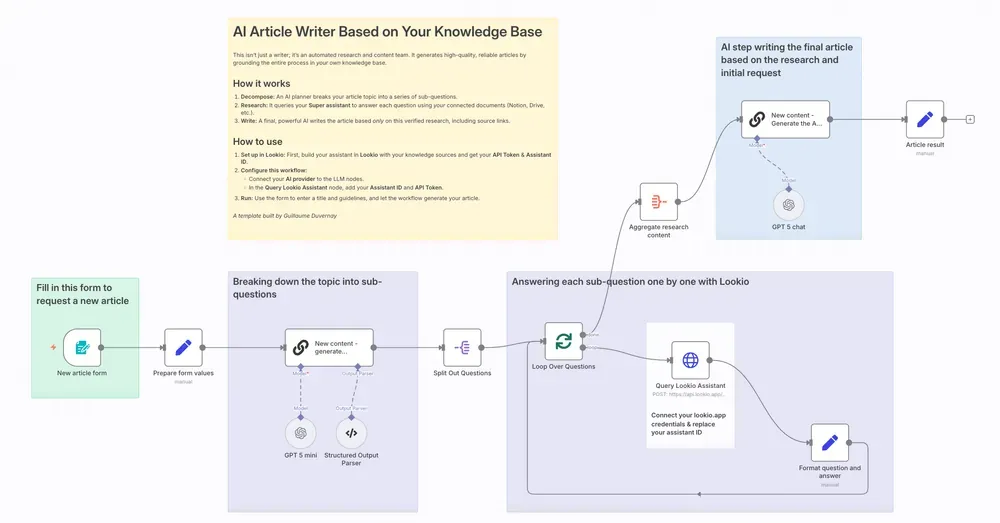
To make implementing this automation even easier, we’ve published a ready-to-use n8n template. You can access it directly here: Lookio Content Creation Template for n8n.
Replace YOUR_API_KEY with your actual Lookio API key — this is the unique identifier for us to know who is making that request (never share your API key).
Replace YOUR_ASSISTANT_ID with the ID of the Assistant you’d like to query within this workflow.
And replace YOUR_QUERY_HERE with the actual query to run. As you’re automating content generation here, this would typically be a variable whose value comes from an earlier action in your workflow (e.g. the form trigger indicating the title of the article).
NB: “deep” corresponds to one of Lookio’s query modes. “flash” is the fastest mode, which is relevant for time-sensitive workflows (e.g. a customer support bot) and costs 3 credits per query. “deep” is our smartest mode, which we recommend for content creation as there’s no need for speed and quality is the priority (10 credits per run).
Once you’ve set this up, your workflow is ready to query Lookio via API and get high-quality answers that leverage your knowledge base.
Bringing this setup to the next level
I’m sharing here pro tips to significantly upgrade this setup:
- Have an AI step (a simple LLM like GPT-5 mini) break the article topic down into multiple sub-topics, then run one Lookio query per sub-topic and gather a lot of insights before giving them all to a final AI step that will write the full article leveraging this comprehensive set of insights.
- Prompt your Assistants and the potential AI redaction steps to include the sources of the insights within the article in the format you prefer (e.g. hyperlinking keywords with the source URL) to automate netlinking.
- Ensure as much human input as possible in the beginning of the flow: don’t simply rely on an article title as the starting point. Have a team member formulate guidelines about the “angle” to follow for this article (e.g. telling what to highlight first, describing the article’s specific audience, etc).
- Integrate this workflow within your company’s data. It can for example be triggered from an Airtable or Softr table that contains all your past articles and helps writing the next ones. Write the article brief in a new row, tick a checkbox that triggers the automation, and receive the AI draft directly within this table.
- Don’t hesitate to leverage multiple Assistants. For example, you can have one Assistant dedicated to finding industry knowledge and another that’ll search through your product documentation to surface the best aspects to highlight about your solution for that specific article. Then, give all that to an AI step that’ll write the final article.
- You don’t need to automate the final redaction of the article. What takes the most time is usually surfacing all the insights, the most interesting customer quotes to feature, and all the statistics to rely on. For Tier 1 articles, automate the insights retrieval (tell the Assistant to use bullet points to list all sourced insights) and let a copywriter take it from there.
You’re now ready. Create a free Lookio account, follow the guide and experiment with workflow, interfaces, making sure to tailor this for the actual operators who will manipulate these automations, and focusing on content quality.