In many AI workflows (e.g. with n8n), you’ll want to retrieve data from a specific knowledge base before letting an AI leverage that knowledge.
Take the example of a customer support chatbot built in n8n using its native chat trigger and widgets. You definitely don’t want a generic LLM answering questions about your product; the AI needs to know how your product works. This is a classic use case where you need to connect your knowledge base to the AI agent.
There are multiple ways to get there.
The knowledge base in the LLM’s context window
If your knowledge base is quite short (just a few pages of text), you could directly put it all in the context window of the agent. That way, for every query, it will access the entire knowledge base and have the relevant context to answer the user.
However, in many cases, the knowledge base is significant—consisting of dozens, hundreds, or even thousands of pages. Putting all of this into the context window won’t work well for several reasons:
- Models have context window limits. Some accept 120k tokens, some 200k, some 1 million. If your knowledge base is bigger than that, you won’t have any space left to pass the actual user prompt.
- You pay for every token. For every single AI query, you would be paying to process the full knowledge base that’s passed as an input.
- LLM performance degrades with larger contexts. Accuracy and reliability tend to decrease as the context window grows. The model gets overwhelmed with too much information, making it less effective at providing reliable answers.
Introducing RAG (Retrieval-Augmented Generation)
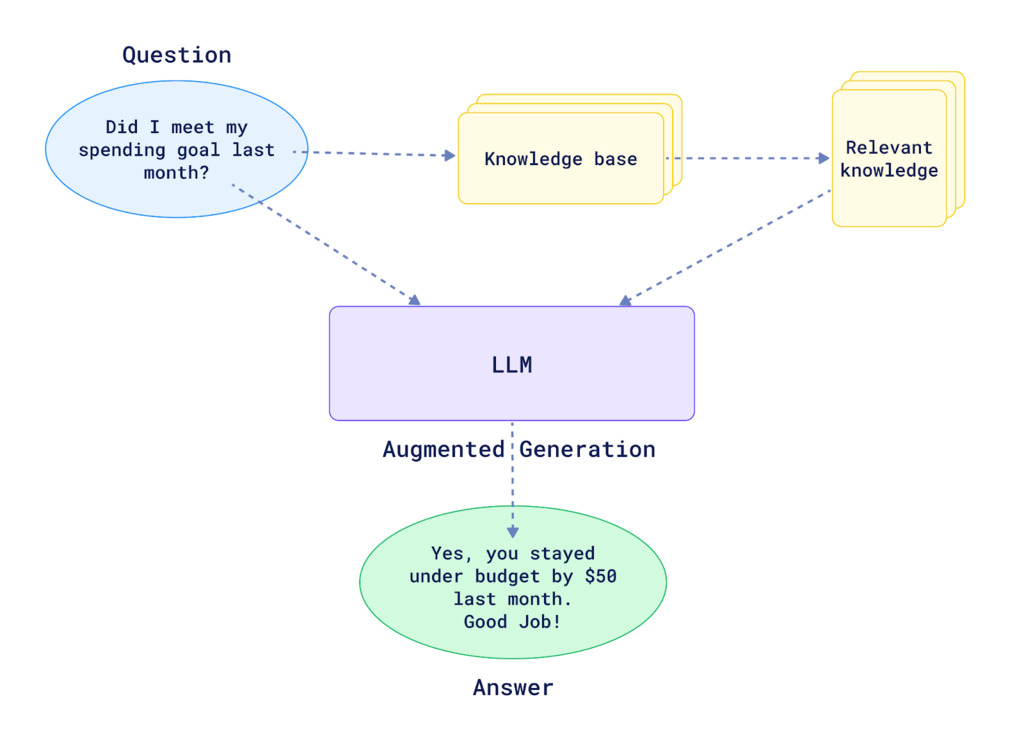
This is where RAG becomes incredibly useful. Basically, RAG helps you find the most relevant parts of your knowledge base and feeds only those pieces to your AI steps or agents. This gives them the right context to answer a user’s query without being overwhelmed by unrelated information.
Here is Nvidia’s definition of RAG:
Retrieval-augmented generation (RAG) is an AI technique where an external data source is connected to a large language model (LLM) to generate domain-specific or the most up-to-date responses in real time.
What is RAG? A schema by Qdrant
If you want to build your own RAG system within n8n, you’ll have to implement two main flows.
RAG data pipeline
The first step is getting your documents into a vector store (also called a vector database).
NB: A vector store is a specialized data storage system that holds and indexes high-dimensional vectors, enabling fast similarity searches and retrieval operations for AI and machine learning applications.
n8n natively integrates with multiple vector store providers: Qdrant, Pinecone, Supabase, and others.
You’ll need an n8n workflow that gets the text from your documents. If they are in PDFs, you’ll first have to extract the text. Then, you’ll use a node that inserts documents into the vector store provider you have selected. In this node, you can select your embedding model from providers like OpenAI or Mistral, and you can also define your chunking strategy (e.g., splitting the text every 1,000 characters with a 200-character overlap).
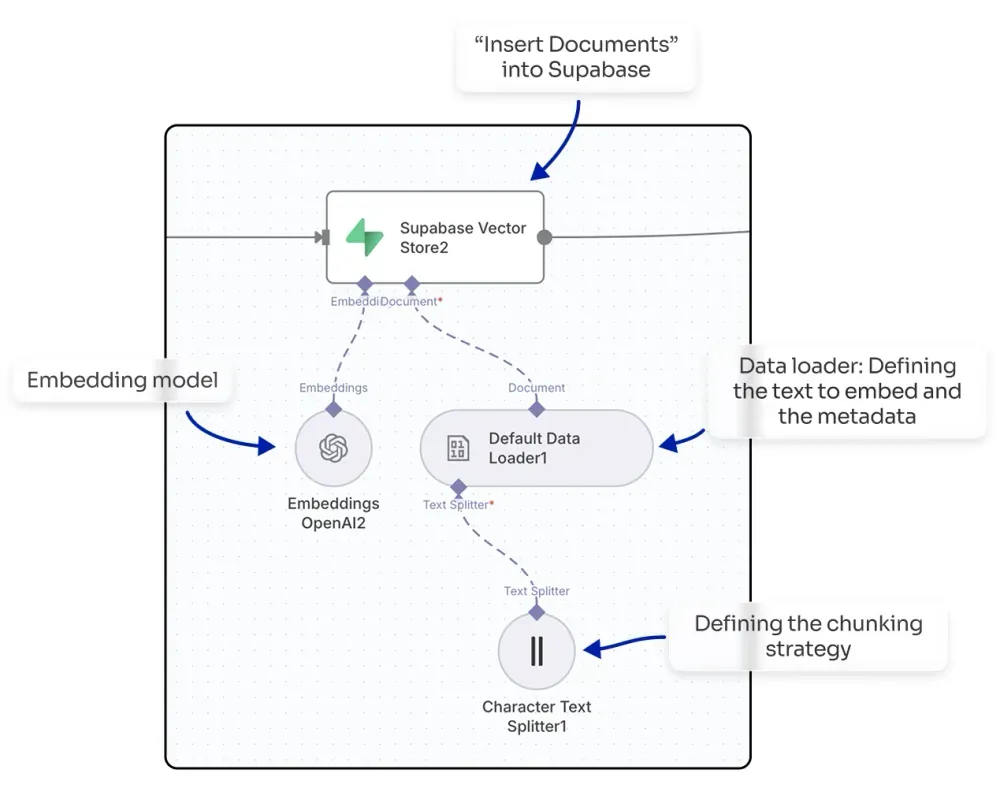
By doing this, you will embed your knowledge base, making it ready to be queried within your n8n workflows.
Knowledge retrieval
To query your vector store and get the top-matching chunks, you can use a vector store as an agent tool, which will automatically find the relevant chunks for the agent to use. Alternatively, you could build more advanced flows where your agent calls a sub-workflow to process the query in a more sophisticated way (e.g., enabling multi-query or applying score thresholds to filter chunks before sending them to the agent).
You don’t always have to use RAG in an agentic context. You can also use it to power a search engine, where the RAG approach helps you find top results for a query without requiring an LLM to reprocess the output.
The real challenges: Why DIY RAG systems fail
Even though n8n provides templates to get started with RAG, implementing a highly reliable RAG system is not an easy task. There are countless moving parts that all need to work together seamlessly.
Challenge 1: Data ingestion and content extraction
Your documents come in different formats. Some are PDFs. Some are Word docs. Some are plain text. Some are URLs you need to fetch from the web.
Extracting the text correctly is harder than you’d think. A PDF with two-column layouts, handwritten notes, or embedded images? Simple text extraction will butcher it. Characters get rearranged. Formatting gets lost. Words end up in the wrong order. And here’s the golden rule: garbage in, garbage out. If your extracted text is messy, your AI can’t retrieve the right chunks later.
Challenge 2: Chunking strategy
How do you split your documents into chunks? By page? By paragraph? By a fixed number of characters?
Get this wrong, and your retrieval falls apart. If your chunks are too small, they lack context. If they’re too big, you’re back to the “too much noise” problem. You need to find the sweet spot—and it varies depending on your content.
Challenge 3: Metadata tagging
When a chunk is retrieved, you want to know where it came from, right? What document? What page? What URL?
This requires robust metadata strategy. You need to tag each chunk with enough information so that when the AI cites its source, the source is actually correct and useful.
Challenge 4: Vector database integration
Your chunks need to be embedded in a vector space and stored in a specialized database (like Qdrant or Pinecone). This is where the semantic search magic happens.
But setting this up, managing it, scaling it—that’s non-trivial infrastructure work.
Challenge 5: Retrieval logic
When a query comes in, how do you actually retrieve the right chunks?
Simple semantic similarity? That works for straightforward questions. But what about complex, multi-step queries? What about questions that require reasoning across multiple chunks?
You need sophisticated retrieval logic—and you might need multiple retrieval strategies depending on the question type.
Challenge 6: Answer generation and source attribution
Once you have the right chunks, an AI needs to synthesize them into a coherent, well-sourced answer.
This requires careful prompt engineering. You need to instruct the AI to cite its sources, avoid making up information, and integrate the chunks seamlessly.