
The fastest way to respond to an RFP is to have already answered every question before. That’s exactly what a well-built AI knowledge retrieval system enables: it finds the right answer from your existing documentation, reshapes it to match the exact format required, and lets your team focus on the 20% that actually needs human judgment.
Most companies responding to RFPs and security questionnaires are sitting on years of winning responses, compliance reports, and product documentation that already contain 90% of the answers they need. The problem isn’t the knowledge. It’s that finding the right paragraph, in the right document, phrased in the right way for this specific questionnaire, takes hours of manual searching and copy-pasting.
Dedicated RFP response software exists, and some of it is excellent. But these platforms typically cost thousands per month, lock you into rigid workflows, and don’t integrate easily with the rest of your automation stack. If you’re a team that already uses tools like n8n, Make, or Zapier for business automation, you can build something equally powerful with a general-purpose knowledge retrieval platform at a fraction of the cost.
Why “just use ChatGPT” fails for RFPs
The instinct most teams have is to paste their documentation into ChatGPT and ask it to answer questionnaire questions. This works for a few questions, but it breaks down predictably:
- Context window limits. A serious RFP knowledge base includes SOC 2 reports, past proposals, product docs, and compliance certifications. That’s easily 500+ pages. Pasting it all into a prompt isn’t physically possible, and even when you batch it, the AI’s accuracy degrades significantly past ~5,000 words of context.
- No source attribution. When your team reviews a draft answer, they need to know where the information came from to verify it. Copy-pasting into ChatGPT gives you a response with zero traceability.
- No repeatability. Every time a new RFP arrives, someone has to manually copy documents, craft prompts, and format outputs. There’s no system, just labor.
- No improvement over time. The process doesn’t learn. If you wrote a great answer to “Describe your data retention policy” last month, that answer isn’t automatically available next time.
The alternative is Retrieval-Augmented Generation (RAG): instead of overloading an AI model with your entire documentation, a RAG system finds only the most relevant sections for each specific question and feeds those to the AI. The result is faster, cheaper, more accurate, and comes with the sources cited.
What makes RFPs uniquely well-suited for RAG automation
What I’ve seen consistently from teams using Lookio for RFPs is that this use case has a specific property that makes it one of the best candidates for automation: most questions have already been asked before, just in different words.
A security questionnaire might ask “How do you handle data at rest encryption?” while a previous RFP asked “Describe your encryption standards for stored data.” The underlying answer is identical. The only thing that changes is the phrasing, the required format (bullet points vs. a paragraph vs. a yes/no with elaboration), or the level of detail requested.
This is precisely what RAG excels at. It doesn’t do keyword matching. It understands the semantic meaning of a question, finds the most relevant sections across all your documents, and generates a response that directly addresses the specific phrasing. A platform like Lookio runs multiple background queries to break down complex questions into smaller chunks before crafting the final output, achieving the kind of nuanced, multi-source synthesis that RFPs demand.
NB: The mistake most companies make when they first set this up is uploading raw, unvetted documents. If your past RFP responses contain outdated pricing, deprecated features, or inaccurate compliance claims, the AI will confidently reproduce those errors. The quality of your output is determined entirely by the quality of what you put in.
Building your RFP knowledge base (the right way)
The biggest differentiator between a system that saves time and one that creates new problems is how you build the knowledge base. Here’s the process I recommend:
Step 1: Mine your past RFPs
Start with your last 10 to 20 winning proposals. Extract every question-and-answer pair into a spreadsheet. This is your raw material.
Now comes the critical part that most people skip: have your team manually review each answer. Flag anything that’s outdated, mark answers that reference deprecated features, and update compliance statements to reflect your current certifications. The goal is to end up with a curated, approved set of Q&A pairs that you would be comfortable publishing today.
This review typically takes a few hours, but it’s a one-time investment that compounds. Every answer you approve is an answer you’ll never have to write from scratch again.
Step 2: Add your compliance and product documentation
Beyond past RFPs, you likely have several high-value documents that contain answers to questions your team gets repeatedly:
- SOC 2 / ISO 27001 reports with detailed descriptions of your security controls
- Product documentation that covers architecture, integrations, and capabilities
- Internal knowledge bases on Confluence, Notion, or SharePoint with policies and procedures
- Security whitepapers describing your approach to encryption, access control, and incident response
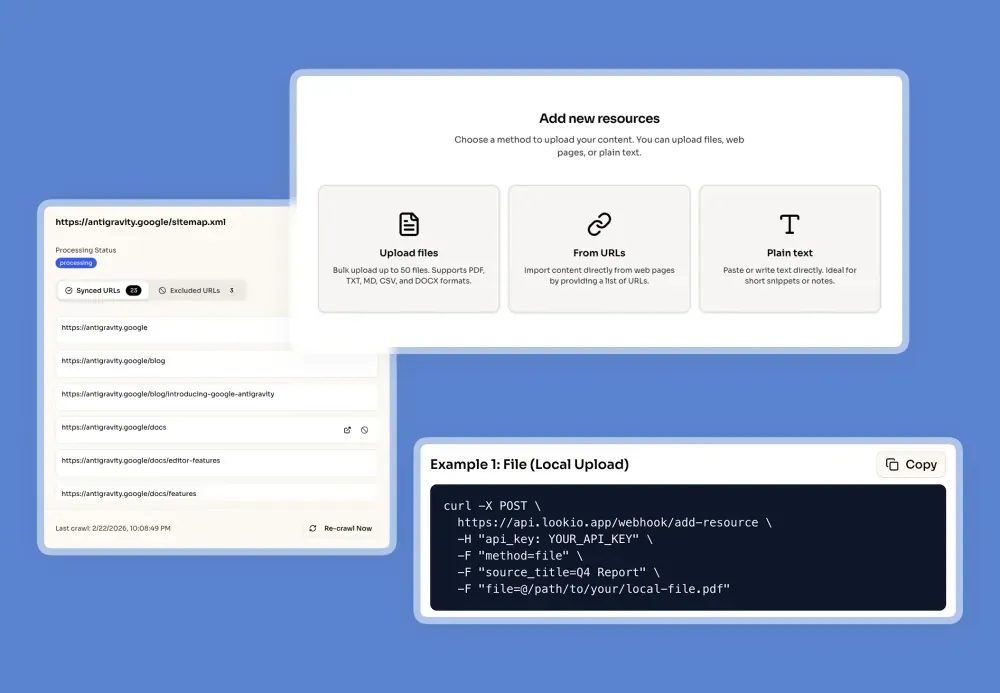
Upload all of these as resources in Lookio. You can import PDFs, text files, paste content directly, or even sync entire sitemaps to automatically keep your documentation current.
Step 3: Create a dedicated RFP assistant
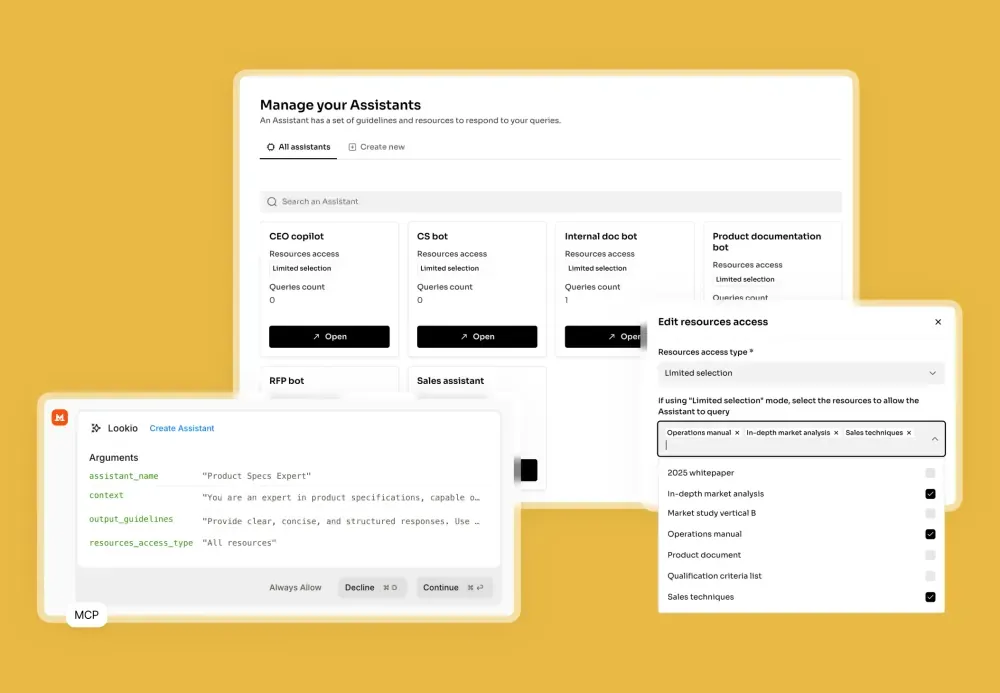
This is where the configuration starts to matter. In Lookio, create an assistant specifically for RFP responses. The key is in the context and output guidelines.
For the context, be specific about the assistant’s role: it should act as a proposal manager that frames your capabilities in the strongest possible light while staying strictly truthful to the source material. Tell it to provide the “how” and “why” behind yes/no answers, and to prioritize information from the most recent documents when it finds conflicting answers.
For the output guidelines, define the format you typically need: professional business language, confidence levels (High/Medium/Low) based on the quality of retrieved information, and source citations at the bottom of each response. If the exact answer isn’t in the knowledge base, instruct it to draft a placeholder wrapped in [[DOUBLE BRACKETS]] so your reviewer immediately knows to verify it manually.
We’ve published a complete RFP assistant prompt template that you can use as a starting point.
Automating bulk RFP responses from a CSV
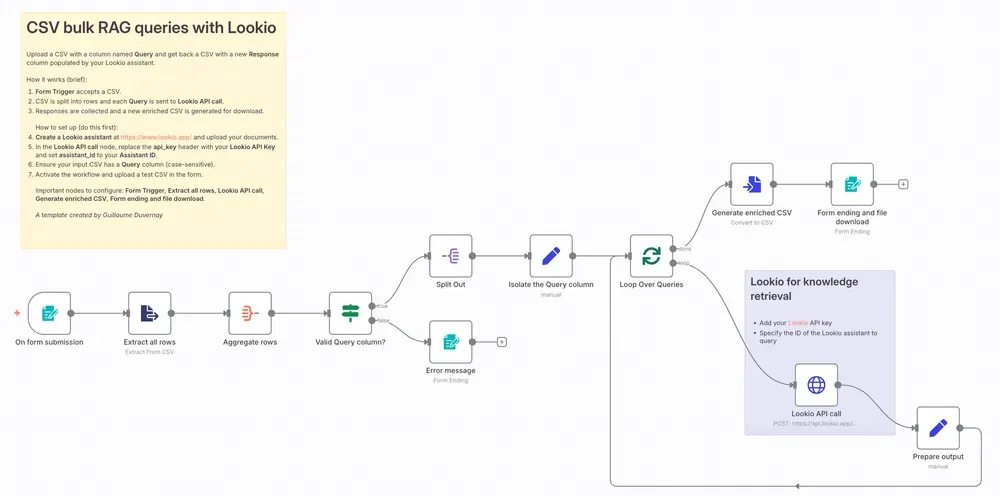
Once your assistant is configured, the real productivity gain comes from automating the entire questionnaire at once. Instead of querying one question at a time, you process the complete CSV in a single workflow run.
The process works like this:
- Prepare your CSV. Take the RFP questionnaire and structure it with one question per row in a “Query” column. If the questionnaire already has a column for responses, you can use that as the target column.
- Run the workflow. A workflow (built in n8n, Make, Zapier, or a custom script) loops through every row, sends each question to your Lookio assistant via the API, and appends the response as a new column.
- Download the enriched file. You get back a complete CSV with AI-generated, source-cited answers for every single question.
Here’s the API call at the core of the workflow:
curl -X POST \
  https://api.lookio.app/v1/query \
  -H "Content-Type: application/json" \
  -H "api_key: YOUR_API_KEY" \
  -d '{
    "query": "YOUR_RFP_QUESTION_HERE",
    "assistant_id": "YOUR_ASSISTANT_ID",
    "query_mode": "deep"
  }'
We recommend Deep Mode (20 credits per query) for RFPs because these questions require high-level reasoning, synthesis across multiple documents, and persuasive writing. For straightforward compliance yes/no questions, you can drop to Flash Mode (3 credits) to optimize costs.
We’ve published a ready-to-use n8n template that handles the entire loop, from CSV upload to enriched file download, out of the box.
Building a full RFP workflow with an interface
For teams that process RFPs regularly, you can go further than a one-off CSV upload. Build a dedicated internal tool where your team can:
- Drop a CSV into a web interface (built with a tool like Softr, Retool, or a custom app)
- Store the file in a database attached to that interface
- Click a button that triggers an automation workflow (n8n, Make, or Zapier)
- The workflow reads the CSV, loops through each question, queries your Lookio assistant, and writes back the completed file
- The completed CSV appears in the same interface, ready for download and team review
This turns the entire RFP process into a production line. A new questionnaire arrives, someone uploads it, clicks a button, and within minutes has a first draft that covers 80%+ of the answers. Your proposal team’s job shifts from writing answers from scratch to reviewing and refining pre-filled responses.
Why human review still matters (and where AI saves the real time)
Here’s the contrarian take that most AI-for-RFPs marketing will never tell you: full automation is not the goal. For high-stakes proposals worth millions in contract value, you absolutely want a human reviewing every answer before submission.
What AI actually does is eliminate the hours spent on the lowest-value task in the RFP process: finding information. Without AI, a sales engineer spends most of their time hunting through past proposals, Confluence pages, and SharePoint drives to find the relevant paragraph, then reformatting it to match the questionnaire’s requirements. With a well-built RAG system, that search-and-format step happens in seconds.
The time saved is massive. But the real value is in the sources. When your AI-generated answers come with citations pointing to the exact document and section they were pulled from, your reviewer can immediately:
- Open the source to verify the answer is still accurate
- Refine the language to better match the specific prospect’s requirements
- Confirm that compliance claims reflect your current certifications
This is a trust layer. Your team isn’t blindly submitting AI outputs. They’re operating with a pre-filled draft that dramatically accelerates their review process. From days of writing to hours of reviewing.
Detecting and filling knowledge gaps
One of the most valuable side effects of running AI queries against your knowledge base is that it exposes the gaps.
When a question comes back with a low-confidence answer, or the assistant flags something with [[DOUBLE BRACKETS]], that’s a signal: your documentation doesn’t cover this topic well enough. This is actionable intelligence.
Here’s the process for turning gaps into permanent improvements:
- Flag the question during review as a gap
- Route it to the right person (security lead, engineering, product manager) to write the authoritative answer
- Add the approved answer as a new resource in Lookio (a simple text upload or API call)
- Next time that question, or any semantically similar question, appears in an RFP, the assistant has the answer
Over months, this creates a self-improving system. Every RFP you complete enriches your knowledge base for the next one. The 80% coverage becomes 85%, then 90%, then 95%. The questions that need manual attention become increasingly rare and increasingly specific.
Going further with AI agents
For teams that are already working with AI coding agents like Claude Code or Antigravity, you can take this a step further. Instead of running a workflow manually, you can write a skill that your agent executes autonomously.
We’ve published an agent skill template designed specifically for this. Your agent reads the CSV, connects to Lookio via the MCP Server or the CLI, iterates through every question, and writes the completed answers back to a new file, all without you touching a browser.
The agent can even be instructed to use different query modes based on the question type: Flash for standard security compliance questions (“Do you encrypt data at rest?”) and Deep for complex architectural questions (“Describe your multi-tenant isolation strategy and how it handles cross-account data segregation”).
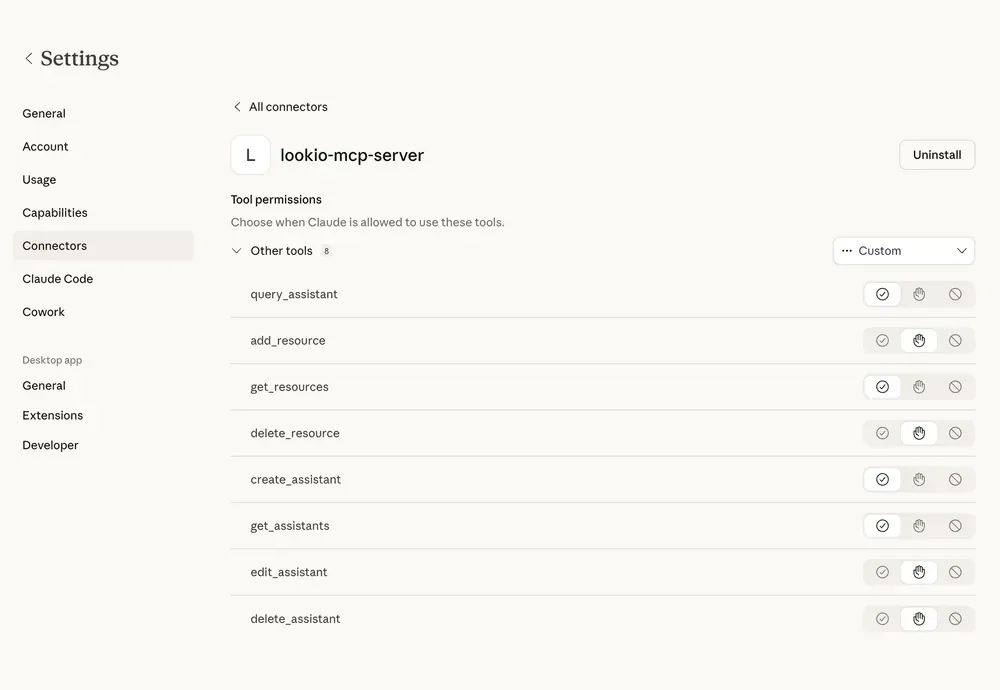
Beyond answering questions, these agents can also maintain your knowledge base. When your product ships a new feature, when you achieve a new certification, or when a policy changes, an agent can update the relevant resource in Lookio via the API, ensuring the next RFP run automatically reflects the latest information.
Getting started in 30 minutes
Here’s the practical path to your first automated RFP response:
- Create a free Lookio account (100 free credits, no credit card)
- Upload 3 to 5 key documents: your best past RFP, your SOC 2 report, and your core product documentation
- Create an RFP assistant using our prompt template as a starting point
- Test it with 10 real questions from a recent RFP using the Lookio interface
- Scale it by deploying the bulk CSV workflow in n8n or your preferred automation tool
The companies that win the most RFPs aren’t the ones with the largest proposal teams. They’re the ones who’ve systematized their knowledge so completely that answering 200 questions is a matter of clicking a button and spending an afternoon reviewing, not a week of writing from scratch.
Your documentation already contains the answers. The only thing missing is a system that retrieves them on demand.