Automate answering large sets of questions using your company’s knowledge. This n8n workflow template processes a CSV file, sends each question to your Lookio assistant, and returns an enriched CSV with accurate, AI-generated answers sourced directly from your documents.
What it does & who it’s for
This template is the fastest way to integrate Lookio’s powerful RAG capabilities into your data-processing tasks.
- Key features:
- Automate bulk queries: Instantly process hundreds of questions without manual effort.
- Get grounded answers: Responses are generated from your documents via Lookio’s API, minimizing hallucinations.
- Receive a ready-to-use file: Outputs an enriched CSV with a new “Response” column.
- Perfect for:
- Sales & proposal teams: Drafting RFP answers.
- Support & ops teams: Bulk-enriching FAQs and ticket templates.
- Knowledge managers: Validating questions against internal docs.
How it works
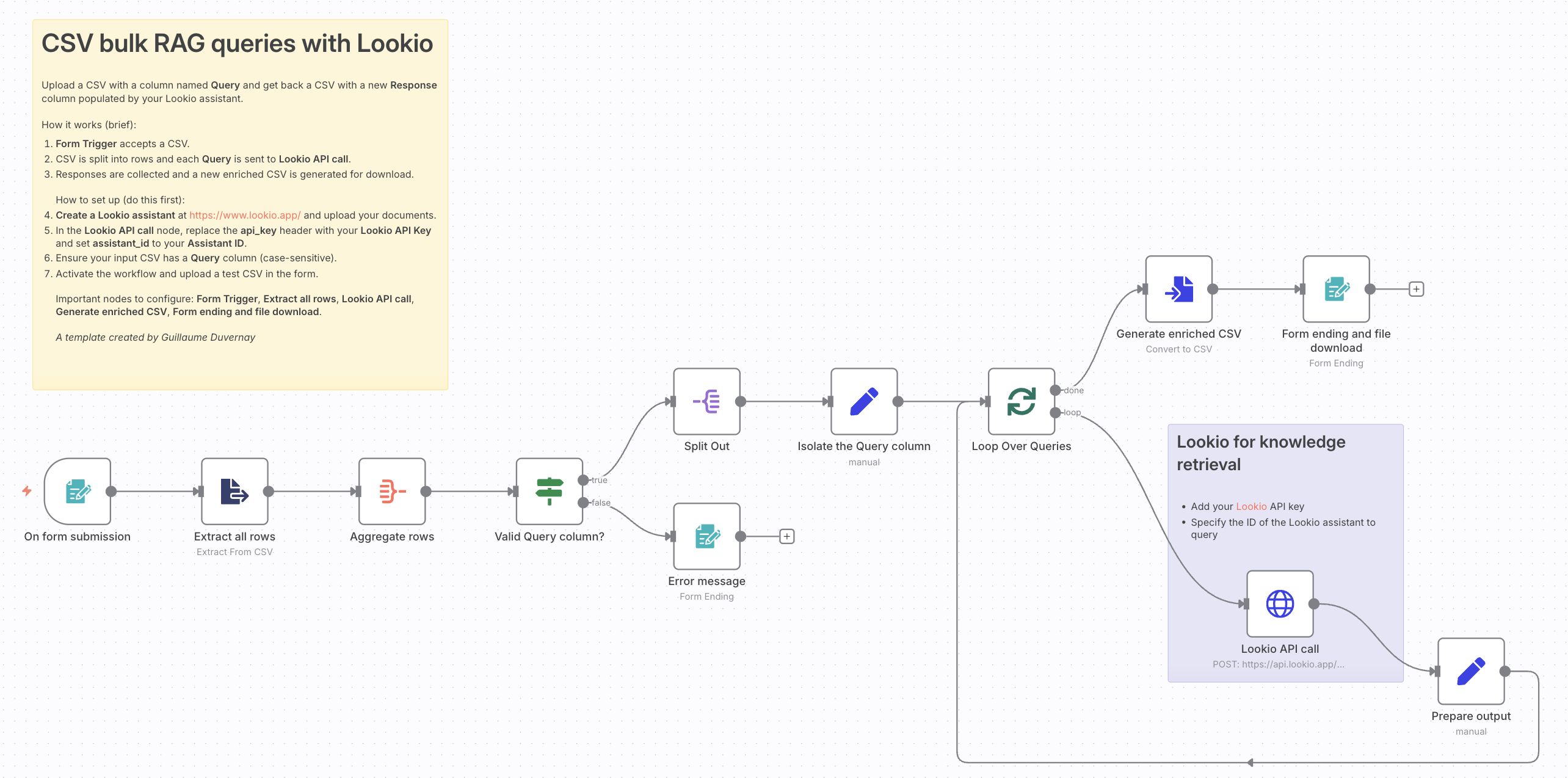
The workflow is simple and efficient:
- Upload: A user submits a CSV with a “Query” column via the n8n Form Trigger.
- Loop & query: The workflow iterates through each row, sending the question to your Lookio assistant via an API call.
- Enrich & download: The assistant’s answer is appended to the row, and the workflow provides a link to download the completed CSV.
Setup and requirements
Get started in minutes.
- You’ll need:
- An active n8n instance.
- A Lookio account with your API Key and an Assistant ID.
- Quick setup:
- In the workflow’s HTTP Request node, add your Lookio API Key (in headers) and Assistant ID (in the body).
- Ensure your input CSV has a column named
Query. - Activate the workflow and upload your file.
Why use Lookio for RAG in n8n?
Building reliable Retrieval-Augmented Generation (RAG) is complex. Lookio provides a managed RAG service via a simple API, handling the entire backend pipeline—from document processing to advanced retrieval. This lets you focus on building powerful n8n automations, not managing complex AI infrastructure.
Ideas for customization
This template is a great starting point. You can easily extend it:
- Improve speed: Parallelize the API calls instead of looping sequentially for faster processing.
- Store results: Add an Airtable or Google Sheets node to log all questions and answers.
- Change triggers: Start the workflow from a new file in a Google Drive folder or a new record in Airtable.
You can access the workflow here.