
If you’re working with AI agents like Claude Code, Antigravity, Cursor, or Codex, you already know that they’re only as useful as the knowledge they can access.
Ask your agent to draft a response to a security questionnaire? It’ll give you something generic. Ask it to reference your actual product documentation, compliance policies, and past successful bids? Now you’re talking. But that requires the agent to be able to reach into your company’s knowledge base: directly from the terminal, without you having to copy-paste anything.
That’s why a CLI for RAG matters, and that’s what this article is about.
The shift: from “chatting with AI” to “agents doing work”
We’ve moved past the era of manually prompting ChatGPT. Today, agents like Claude Code or Antigravity sit inside your IDE, your terminal, your workflow, and they execute multi-step tasks autonomously.
But here’s the gap most people hit: the agent doesn’t know your business. It doesn’t have your internal documentation, your product specs, your regulatory frameworks. It’s working from general knowledge, and general knowledge produces generic output.
This is where RAG (Retrieval-Augmented Generation) changes the game. Instead of stuffing 200 pages of documentation into the agent’s context window (which kills both accuracy and budget), RAG retrieves only the specific, relevant parts the agent needs for a given question.
The missing piece? A way for the agent to use RAG natively, from its own environment. That’s your terminal.
Three ways to connect agents to RAG
Before diving into use cases, let’s get the lay of the land. With Lookio, you have three integration paths to the same enterprise-grade knowledge retrieval (and you can use them together):
1. The CLI: install via npm, authenticate once, and your agent can query, upload files, and manage assistants straight from the terminal. The --json flag returns clean, parseable output designed for machines.
2. The MCP server: for agents that support the Model Context Protocol (Claude Desktop, Antigravity, Mistral Chat), Lookio appears as a native tool the agent can discover and use autonomously.
3. The API: full HTTP control for production automation at scale. Build n8n workflows, Make scenarios, or custom integrations that run thousands of queries.
Each serves a different context. The CLI is what we’ll focus on here, because it’s the most direct path for developers working alongside AI agents every day.
Practical workflows: what agents actually do with a RAG CLI
This is where it gets interesting. Once your agent has access to your knowledge base via the CLI, entire categories of work that used to require human research become automated retrieval tasks.
1. Teaching your agent to consult your docs before acting
Most agentic coding tools support a concept called “skills”: markdown files that instruct the agent on how to approach certain tasks. The powerful move is to write a skill that tells your agent: “Before doing anything related to [product/compliance/marketing], query the Lookio assistant first.”
Here’s what that looks like in practice with Antigravity or Claude Code:
-
Create a
rag-research.mdskill that says:“When tasked with writing technical content, compliance responses, or customer-facing documentation, first query the Lookio ‘Product Expert’ assistant using the CLI to retrieve relevant internal insights. Use the results as your primary source material.”
-
Your agent now has a reflex: whenever it encounters a task that needs company knowledge, it runs:
lookio query "What are our data retention policies for EU customers?" \
  --assistant "COMPLIANCE_ASSISTANT_ID" \
--mode flash --json- The CLI returns a JSON response with sourced, cited answers grounded in your actual uploaded documentation. The agent uses this as context for its work, not generic internet information.
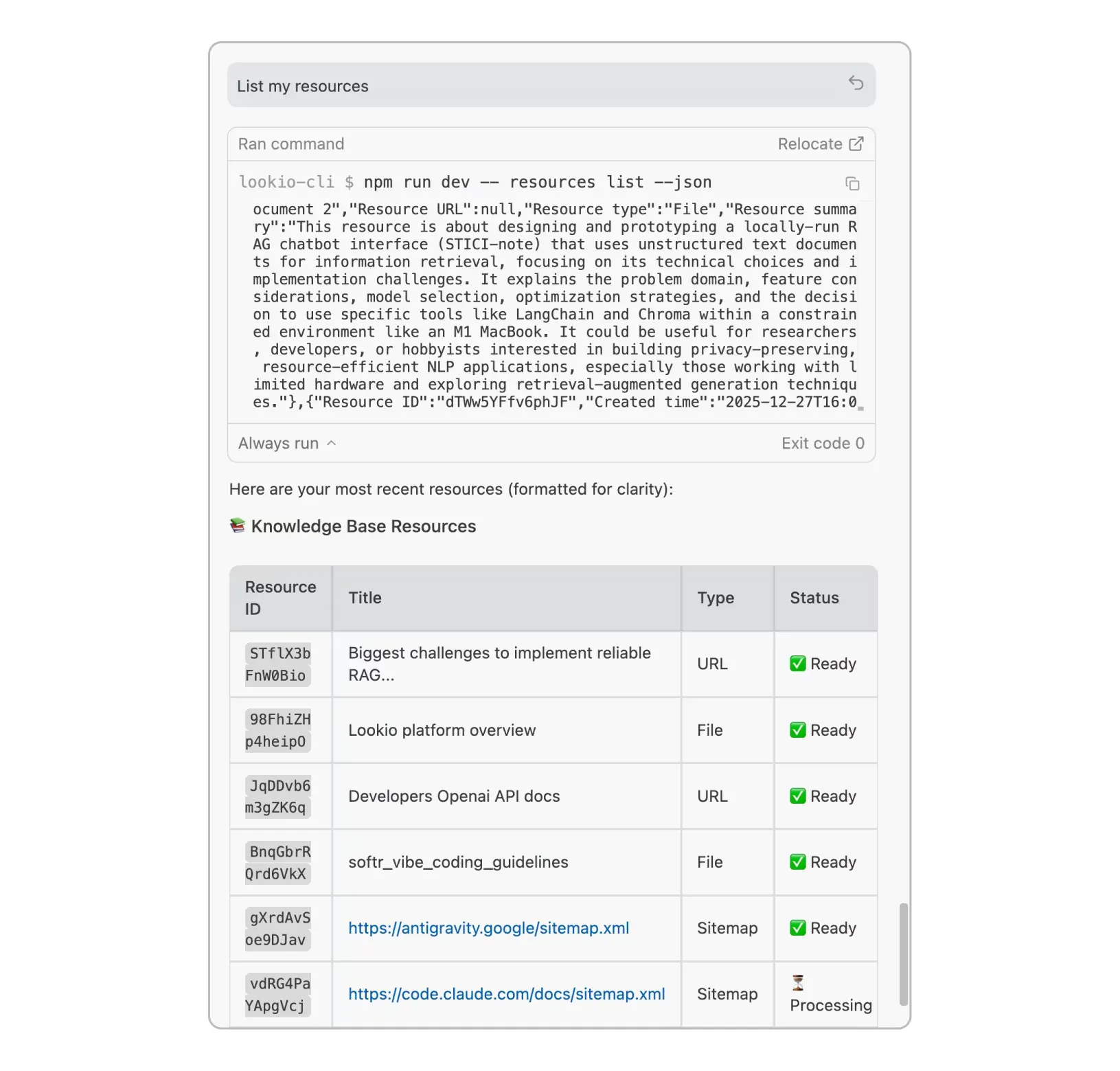
This is a fundamentally different way of working. Your agent doesn’t guess: it retrieves verified truth from your own documents.
2. RFP and security questionnaire automation
This is one of the highest-ROI workflows we’ve seen. Sales engineers and compliance teams face 200+ question RFPs that take weeks to complete manually.
With a CLI-equipped agent, the flow becomes:
- Upload your past successful bids, security whitepapers, and technical architecture documents to your Lookio workspace (either through the dashboard or via the CLI itself):
lookio resources add --title "SOC 2 Whitepaper" --file "./security/soc2-report.pdf"
lookio resources add --title "Architecture Overview" --file "./docs/technical-architecture.pdf"- Create an assistant tuned for RFP responses:
lookio assistants create \
  --name "RFP Expert" \
  --context "You are a security and compliance expert..." \
  --guidelines "Always cite the source document. Be precise about certifications." \
--type "All resources"- For each RFP question, your agent runs a query and drafts the response:
lookio query "Describe your encryption practices for data at rest and in transit" \
  --assistant "RFP_EXPERT_ID" --mode deep --json
The result: responses grounded in your actual certifications and architecture, not vague AI-generated boilerplate. What used to take two weeks can be done in two days.
3. Keeping the knowledge base current
Documentation evolves. Product features ship, policies update, new regulations drop. Your agent can help keep the knowledge base fresh.
Imagine this skill instruction: “When I update a product spec or compliance doc, upload the new version to Lookio and remove the outdated one.”
# Remove the old version
lookio resources delete "OLD_RESOURCE_ID"

# Upload the updated document
lookio resources add --title "API Reference v3.2" --file "./docs/api-v3.2.md"
This turns your knowledge base into a living system rather than a static upload-once-and-forget archive.
4. Content creation backed by real expertise
If you’re producing SEO content at scale, you know that AI-generated articles without unique insights perform poorly. Google’s algorithms and readers alike value content that demonstrates genuine expertise.
The workflow here:
- Your agent receives a topic: “Write about GDPR compliance for SaaS companies.”
- Before writing a single word, it queries your Lookio assistant that holds your entire collection of regulatory docs, past articles, and internal expertise
- The CLI returns sourced, specific insights that the agent weaves into the article using real citations, not hallucinated quotes.
This approach is exactly what we detailed in our AI automations for SEO guide. The CLI just makes it native to how agents already work.
5. Customer support and internal knowledge bots
Your support team uses Slack. Your operations team uses internal wikis. Both need instant, accurate answers from the same knowledge base.
With the CLI, a simple shell script or n8n workflow can pipe incoming questions straight through Lookio:
lookio query "$CUSTOMER_QUESTION" \
  --assistant "SUPPORT_BOT_ID" --mode flash --json
The response comes back with source citations showing exactly which document and page were used, so the support agent (human or AI) can verify and learn instead of blindly trusting.
Why the --json flag matters
A quick technical note, because this is the detail that makes the CLI genuinely agent-friendly rather than just a human convenience tool.
Adding --json to any Lookio CLI command strips all human-readable formatting: colors, spinners, status messages. What you get back is clean, structured JSON that an agent can parse directly.
This means:
- Agents don’t need to “read” terminal output like a human would
- Results can be piped into
jq, other scripts, or directly into the agent’s reasoning - Automation scripts are reliable and predictable, with no screen-scraping
Without this, a CLI is just a human shortcut. With it, the CLI becomes a native tool for autonomous systems.
Getting started
Every Lookio account includes 100 free credits (no credit card, no commitment). Enough to upload some real documents, configure an assistant, and see how it feels to have your agent query your own knowledge base.
npm install -g lookio-cli
lookio login "YOUR_API_KEY"
lookio query "What does our warranty policy cover?" --assistant "YOUR_ASSISTANT" --mode eco --json
From there, write a skill, set up a workflow, and watch your agent go from “generic AI helper” to “expert with access to your company’s entire documented knowledge.”
Create a free account to get your API key. And if you want help designing your first agentic RAG setup, whether CLI, MCP, or API, reach out to us directly.