
Here’s the uncomfortable truth: you’re probably not actually “training” your chatbots at all. And that’s actually a good thing.
When most people talk about training AI chatbots on company data, they’re imagining something like feeding documents into a machine learning pipeline and watching an AI model learn. But in reality, the best approach is far simpler—you’re just giving AI models direct access to your knowledge base when they need it.
This distinction matters. A lot. Because the technique you choose will determine whether your chatbot is accurate, fast, cost-effective, or a complete disaster.
Let’s break down why, and show you the right way to do it.
The problem: Why dumping all your data into ChatGPT doesn’t work
The simplest approach—and the one most people try first—is to copy-paste your entire knowledge base directly into a ChatGPT prompt. Or dump it into the context window of Claude. Let the AI read it all, then ask your question.
It’s tempting. And it works… until it doesn’t.
Here’s what breaks:
1. Context window limits create accuracy problems
When you stuff your knowledge base into a prompt, the AI has to process everything at once. If your knowledge base is only a few hundred words, this works fine. But the moment you exceed around 3,000 to 5,000 words, you’ve got a serious problem.
The AI’s accuracy starts to degrade. This isn’t a bug—it’s how language models work. When you overload the context, the model starts to hallucinate. It generates plausible-sounding answers that aren’t actually grounded in your documents. It misses crucial details. It contradicts itself.
And here’s the thing: you won’t always notice. The hallucination might be subtle. The answer might sound right, but be completely wrong on the details that actually matter.
2. Cost skyrockets with every query
Every token (roughly 4 characters) in your prompt costs money. When you paste your entire knowledge base into every single query, you’re being charged for all of that content repeatedly.
Let’s say you have a 100-page company handbook. That’s roughly 25,000 words. If you paste that into every query to ChatGPT, and your chatbot handles just 100 queries a day, you’re essentially charging yourself 100x for the same knowledge base, every single day.
This is economically absurd.
3. Speed suffers
The AI has to read and process everything you give it. More context means longer processing time. Your chatbot becomes slower. User experience tanks.
The better way: RAG (Retrieval-Augmented Generation)
This is where Retrieval-Augmented Generation—or RAG—changes the game.
Instead of dumping all your data into every prompt, RAG works like this:
-
Your documents are processed and stored as chunks in a vector database. Think of it as cutting your 100-page handbook into smart, searchable pieces (maybe 1,000 characters each). So your 25,000-word handbook becomes 250 chunks.
-
When someone asks a question, only the most relevant chunks are retrieved. Not all 250. Maybe just 5 or 6 of them. The AI uses semantic understanding to find the chunks that actually matter for that specific query.
-
The AI then generates its answer using only those relevant chunks. Not the whole handbook. Just what’s needed.
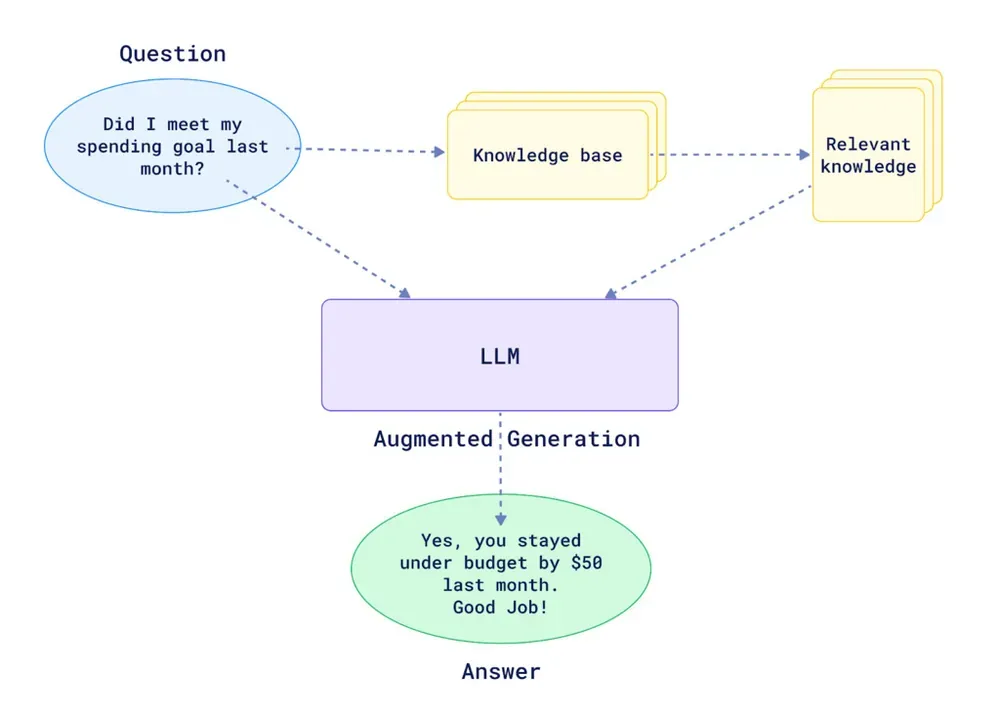
The result? Your chatbot is faster, cheaper, more accurate, and more reliable. The AI has just enough context to answer precisely—without the noise that causes hallucinations.
Building your own RAG system Is… complicated
In theory, RAG sounds straightforward. In practice, it’s a minefield.
Building a robust RAG pipeline requires you to nail multiple complex steps:
1. Data ingestion & content extraction
Your documents come in different formats. Some are PDFs. Some are Word docs. Some are plain text. Some are URLs you need to fetch from the web.
Extracting the text correctly is harder than you’d think. A PDF with two-column layouts, handwritten notes, or embedded images? Simple text extraction will butcher it. Characters get rearranged. Formatting gets lost. Words end up in the wrong order.
And here’s the golden rule: garbage in, garbage out. If your extracted text is messy, your AI can’t retrieve the right chunks later.
2. Chunking strategy
How do you split your documents into chunks? By page? By paragraph? By a fixed number of characters?
Get this wrong, and your retrieval falls apart. If your chunks are too small, they lack context. If they’re too big, you’re back to the “too much noise” problem. You need to find the sweet spot—and it varies depending on your content.
3. Metadata tagging
When a chunk is retrieved, you want to know where it came from, right? What document? What page? What URL?
This requires robust metadata strategy. You need to tag each chunk with enough information so that when the AI cites its source, the source is actually correct and useful.
4. Vector database integration
Your chunks need to be embedded in a vector space and stored in a specialized database (like Qdrant or Pinecone). This is where the semantic search magic happens.
But setting this up, managing it, scaling it—that’s non-trivial infrastructure work.
5. Retrieval logic
When a query comes in, how do you actually retrieve the right chunks?
Simple semantic similarity? That works for straightforward questions. But what about complex, multi-step queries? What about questions that require reasoning across multiple chunks?
You need sophisticated retrieval logic—and you might need multiple retrieval strategies depending on the question type.
6. Answer generation & source attribution
Once you have the right chunks, an AI needs to synthesize them into a coherent, well-sourced answer.
This requires careful prompt engineering. You need to instruct the AI to cite its sources, avoid making up information, and integrate the chunks seamlessly.
The bottom line
All together, this is a lot of moving parts. You’re coordinating data pipelines, vector databases, embedding models, retrieval algorithms, and generation logic.
If you don’t have a dedicated AI engineering team, building this yourself is not recommended. The complexity is real. The room for error is massive. And the maintenance burden is ongoing.
The existing solutions (and why they fall short)
So companies have tried shortcuts.
Custom GPTs
Upload your documents to a custom GPT. ChatGPT handles the RAG for you.
Pros: Easy to set up.
Cons: The accuracy is mediocre. It’s hard to stop the GPT from relying on its own general knowledge instead of your documents. Source attribution is unreliable. And most importantly—there’s no API. You can only interact with it manually through the ChatGPT interface. You can’t automate it. You can’t scale it.
NotebookLM
Google’s NotebookLM is excellent at extracting insights from documents. The answers are generally accurate and well-reasoned.
Pros: Better accuracy than custom GPTs. Beautiful interface.
Cons: Again, no API. You can’t integrate it into your workflows, your website, your Slack, your app. It’s designed for individuals, not for businesses that need to automate and scale.
The solution: Purpose-built knowledge retrieval
This is exactly why Lookio exists.
Lookio is built specifically for companies that want reliable knowledge retrieval without the engineering headache. You upload your documents. Configure your assistants with specific instructions. Then query them via API to automate your workflows.
Lookio handles all the complexity for you:
- Intelligent document ingestion from PDFs, Word docs, plain text, and URLs
- Smart chunking and embedding optimized for your content
- Metadata management to ensure accurate source attribution
- Advanced retrieval logic that finds the most relevant information
- High-quality answer generation with proper source citations
- A robust API so you can automate and scale across your entire business
You don’t need to think about vector databases or embedding models. You just upload, configure, and automate.
Common use cases for knowledge-based chatbots
Marketing Content Generation: Your marketing team lacks deep industry expertise. Rather than interrupt your SMEs constantly or manually research everything, they can query a Lookio assistant integrated into their Make or Zapier workflow. The assistant draws from your company’s methodology and past high-performing content. They get expert-level outlines, fact-checked drafts, and properly sourced insights—at scale.
Customer Support Chatbots: Your website visitors have recurring questions. A chatbot powered by your product documentation can provide instant first-level answers, cite the exact page they should reference, and gracefully escalate to your team when needed. Your support team spends less time on repetitive questions and more time on genuinely complex issues.
Internal Knowledge Bots: Anyone on your team can query your organization’s collective knowledge—company processes, industry expertise, past case studies, methodologies—and get sourced, accurate answers instantly. Knowledge sharing becomes frictionless. No more digging through shared drives. No more “I think that’s documented somewhere.”
Sales Personalization: Your sales team can query your documentation to deeply understand your customer’s industry, your past work with similar clients, and relevant case studies. They build richer, more personalized outreach without spending hours researching.
How to implement knowledge-based chatbots with Lookio
Here’s the practical walkthrough:
Step 1: Upload your knowledge base
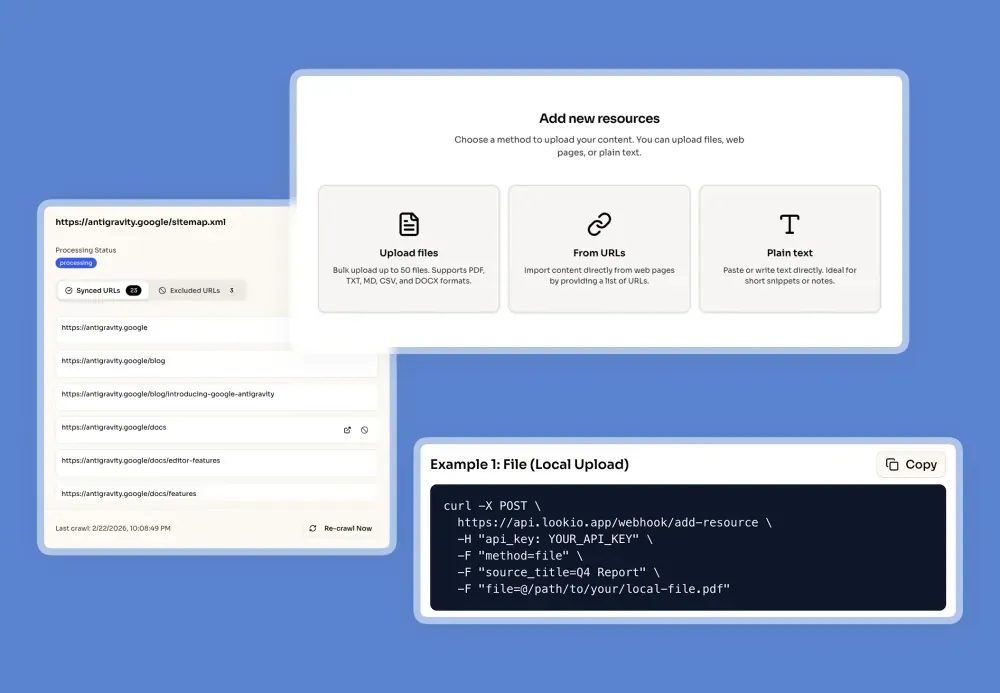
Import your documents into Lookio. You can upload via the platform interface or use the dedicated API endpoint. Supported formats include PDFs, Word docs, plain text, and URLs.
The platform handles the hard parts: Content extraction, text cleaning, optimal chunking, embedding, and vector storage. All automatic.
Step 2: Configure your Assistant
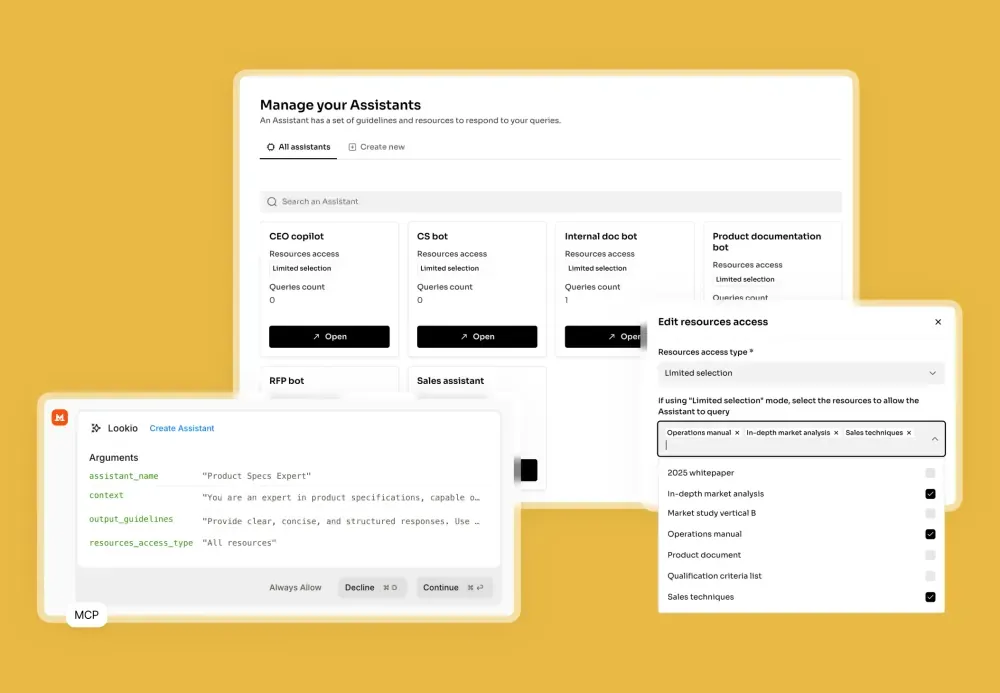
Create a new assistant and set custom instructions. Tell it how to behave, what tone to use, and how to cite sources.
For example:
- “You are an expert in our company’s payroll methodology. Answer questions clearly and cite the relevant policy document.”
- “Generate SEO article outlines based on our company case studies. Always include source links.”
- “Answer customer support questions about our product features. If you’re unsure, recommend they contact [email protected].”
Step 3: Query Your Assistant
Now you have two options:
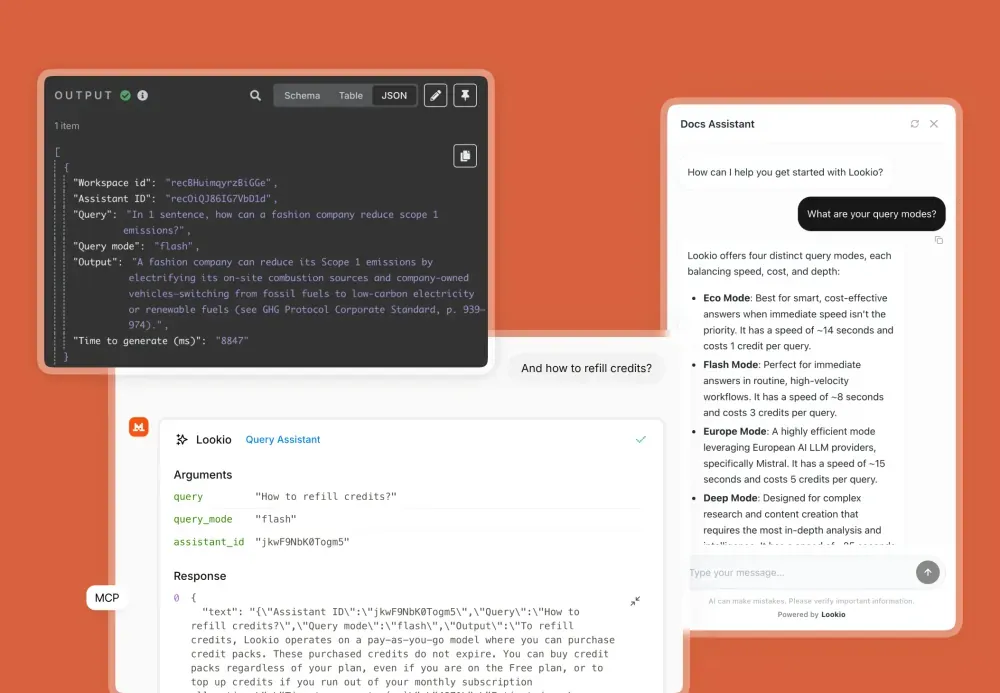
Option A: Direct Chat Interface Test your assistant directly in the Lookio platform. Ask questions, refine instructions, iterate.
Option B: Automate via API Integrate your assistant into your workflows. Send queries from Slack, Make, Zapier, n8n, or any tool with API access.
Here’s a sample API call:
curl -X POST \
  [https://duv-inc-webhook.up.railway.app/webhook/lookio-query](https://duv-inc-webhook.up.railway.app/webhook/lookio-query) \
  -H "Content-Type: application/json" \
  -H "api_key: YOUR_API_KEY" \
  -d '{
    "query": "What are the key compliance requirements for our payroll process?",
    "assistant_id": "YOUR_ASSISTANT_ID",
    "query_mode": "flash"
  }'
The response includes the AI’s answer plus the source documents it referenced.
Step 4: Choose your query mode
Lookio offers three query modes so you can balance speed, accuracy, and cost:
Eco Mode (1 credit): Fast, cost-effective answers. ~15 seconds per query. Great for non-urgent questions where you don’t need the deepest retrieval.
Flash Mode (3 credits): The sweet spot. Excellent retrieval quality, responsive speed (~8 seconds). Ideal for most workflows—customer support, content generation, internal queries.
Deep Mode (20 credits): Maximum intelligence. Uses advanced reasoning to find the most nuanced, complex answers. Best for research-heavy tasks or when accuracy is critical.
You choose the mode per query, so you can optimize each workflow separately. Your marketing bot uses Flash. Your research bot uses Deep. Your high-volume support bot uses Eco.
Real workflows: From concept to automation
Once you’ve set up your assistant, automation is straightforward. Here are templates that already exist:
Build an n8n workflow to generate SEO articles - Your content team queries your Lookio assistant for expert outlines, fact-checks, and sourced insights. The workflow generates high-quality, company-aligned content automatically.
Create a customer support chatbot - Website visitors ask questions. Lookio retrieves answers from your product docs. The bot responds instantly with proper citations.
Automate bulk queries from CSV - Process hundreds of questions at once. Perfect for analyzing customer feedback, enriching sales data, or batch content generation.
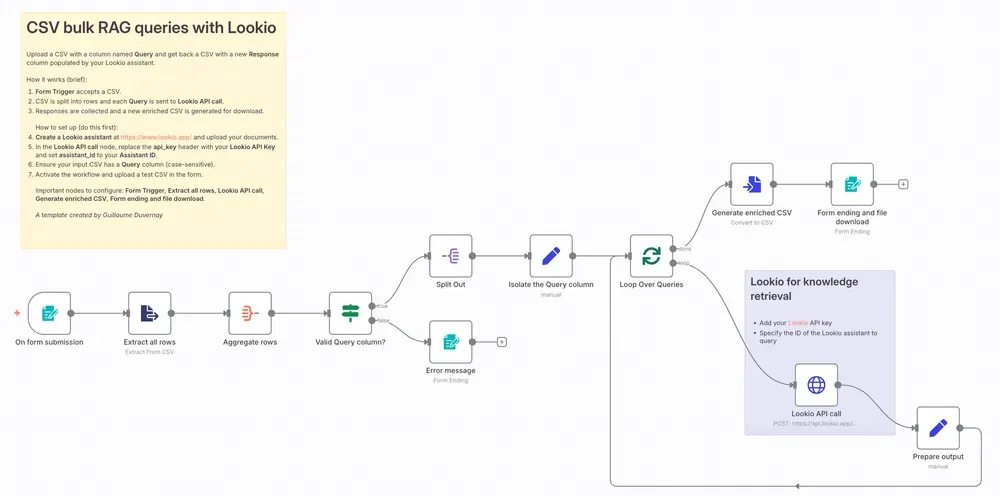
Build a Telegram bot - Your team gets instant access to company knowledge via Telegram. Ask a question, get a sourced answer in seconds.
Combine internal knowledge with web research - Use Lookio for your company data, combine it with live web research (via Linkup), and generate comprehensive expert articles that blend both sources.
The pricing: Pay for what you use, scale when you need to
Lookio pricing is designed for flexibility.
You get 100 free credits to start—no credit card required. That’s plenty to test-drive the platform, build your first assistant, and validate use cases.
When you’re ready to scale, you can purchase credit packs (starting at €6 for 200 credits) or subscribe to a plan for better rates and more storage:
| Plan | Price | Knowledge Base Limit | Monthly Credits |
|---|---|---|---|
| Free | €0 | 125,000 words | 100 on signup |
| Starter | €19/mo | 500,000 words | 1,000 |
| Pro | €79/mo | 2,500,000 words | 5,000 |
There’s no long-term contract. Use pay-as-you-go for occasional queries. Subscribe when you’re running regular workflows. Cancel anytime.
Pro tips: Getting the most from your knowledge base
1. Organize your documents strategically
Create separate assistants for different functions. One for marketing content. One for customer support. One for internal ops.
This isn’t just organization—it’s performance optimization. A focused assistant with curated documents will retrieve more relevant, accurate information than a bloated assistant trying to handle everything.
2. Invest in your source informations
When you upload documents, add clear resource title and if possible, an URL.
This enables your Lookio Assistants to quote the sources when surfacing insights from a specific document, and allows the integration of hyperlinks that can be super useful for your team to click to check the original document.
3. Use the right query mode for each workflow
Don’t default to Deep mode for everything. That’s wasteful.
Match the mode to the urgency and complexity: High-volume customer support = Eco. Content generation = Flash. Complex research = Deep.
4. Iterate on your Assistant instructions
Your first instructions won’t be perfect. Refine them based on real queries.
If your assistant is too verbose, tighten the instructions. If it’s missing context, expand them. If it’s citing the wrong sources, clarify what “source” means in your domain.
5. Monitor your output for accuracy
Set up spot-checks. Periodically review what your assistant is producing.
Especially in the early days. Make sure it’s citing sources correctly, not hallucinating, and actually relying on your documents. This catches problems before they cascade.
n8n offers an excellent Evaluation feature you should definitely leverage!
Btw: Lookio scored 37/40 on their n8n Arena RAG challenge, which is the highest score recorded!
The bigger picture: Companies that document win
Here’s what’s happening in 2026: companies that invest in thorough documentation are finally collecting the dividends of that work.
For years, documentation was a burden. You documented your processes because you “had to.” It sat in shared drives and Notion workspaces, gathering dust.
Now, with AI, documentation becomes a strategic asset. It powers your chatbots. It accelerates your content creation. It democratizes expertise. It scales your team’s knowledge without hiring more experts.
But only if you have the right tools to leverage it.
This is where Lookio comes in. Not to complicate your life with more infrastructure to manage, but to simplify it. To handle all the complexity of RAG so you can focus on what matters: building the workflows that actually drive your business.
You don’t need an AI engineering team to build high-quality knowledge retrieval. You need the right platform.
Ready to transform your documentation into an automated advantage? Get started with Lookio for free—100 credits, no credit card required. Build your first assistant. See how your knowledge base can power your team.
And if you want to see this in action, check out our templates for pre-built workflows. Marketing. Support. Internal ops. Pick one, customize it, and start automating.
Your documentation is already there. It’s time to make it work for you.