FREE
100 credits offered · No subscription needed

AI Assistant for Business Development

Transform locked company documentation into a programmatic engine for high-velocity, hyper-relevant sales outreach and prospecting.

Get started free
Lookio AI painterly background
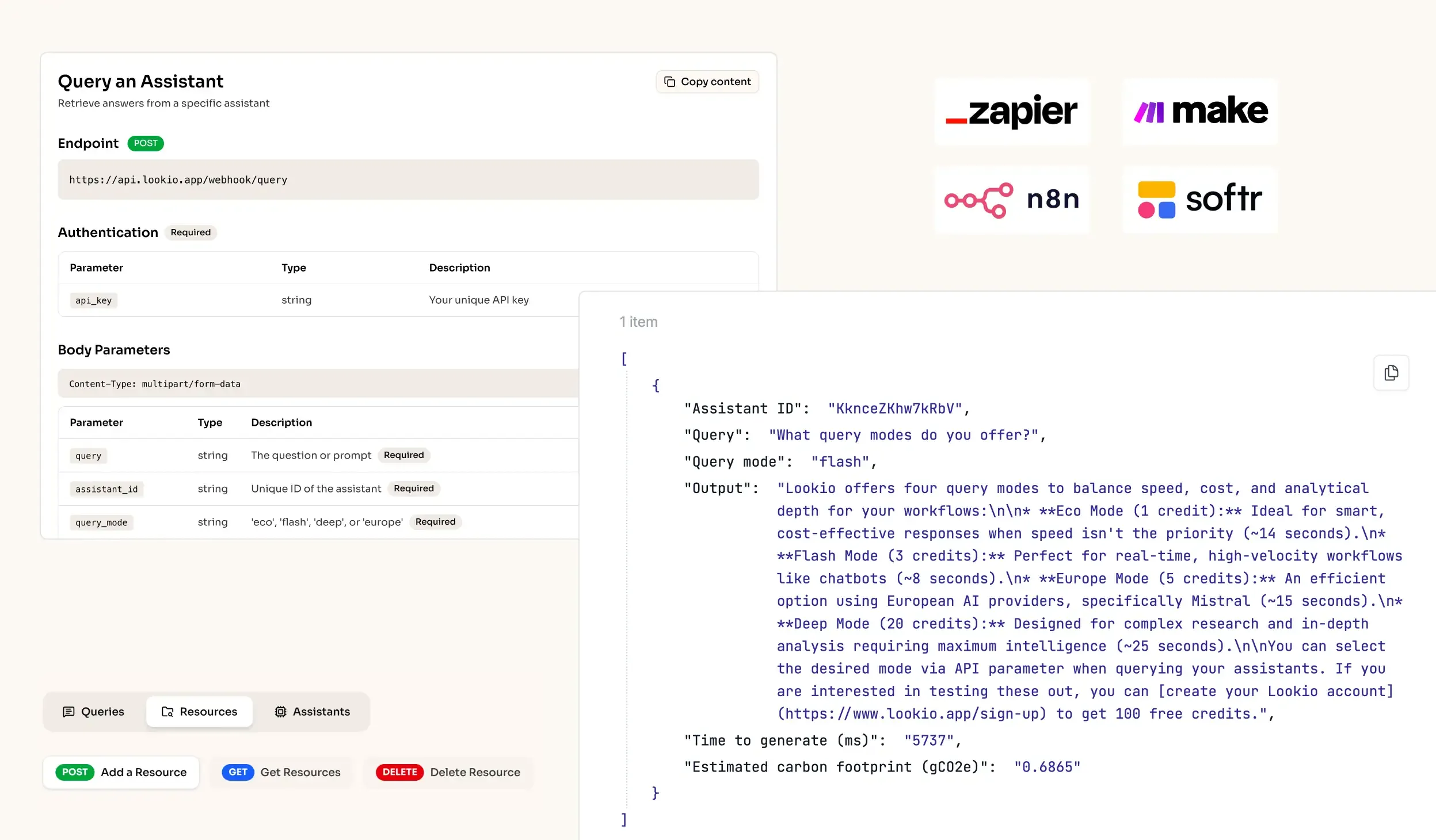
API Integration for RAG AI knowledge retrieval in workflows
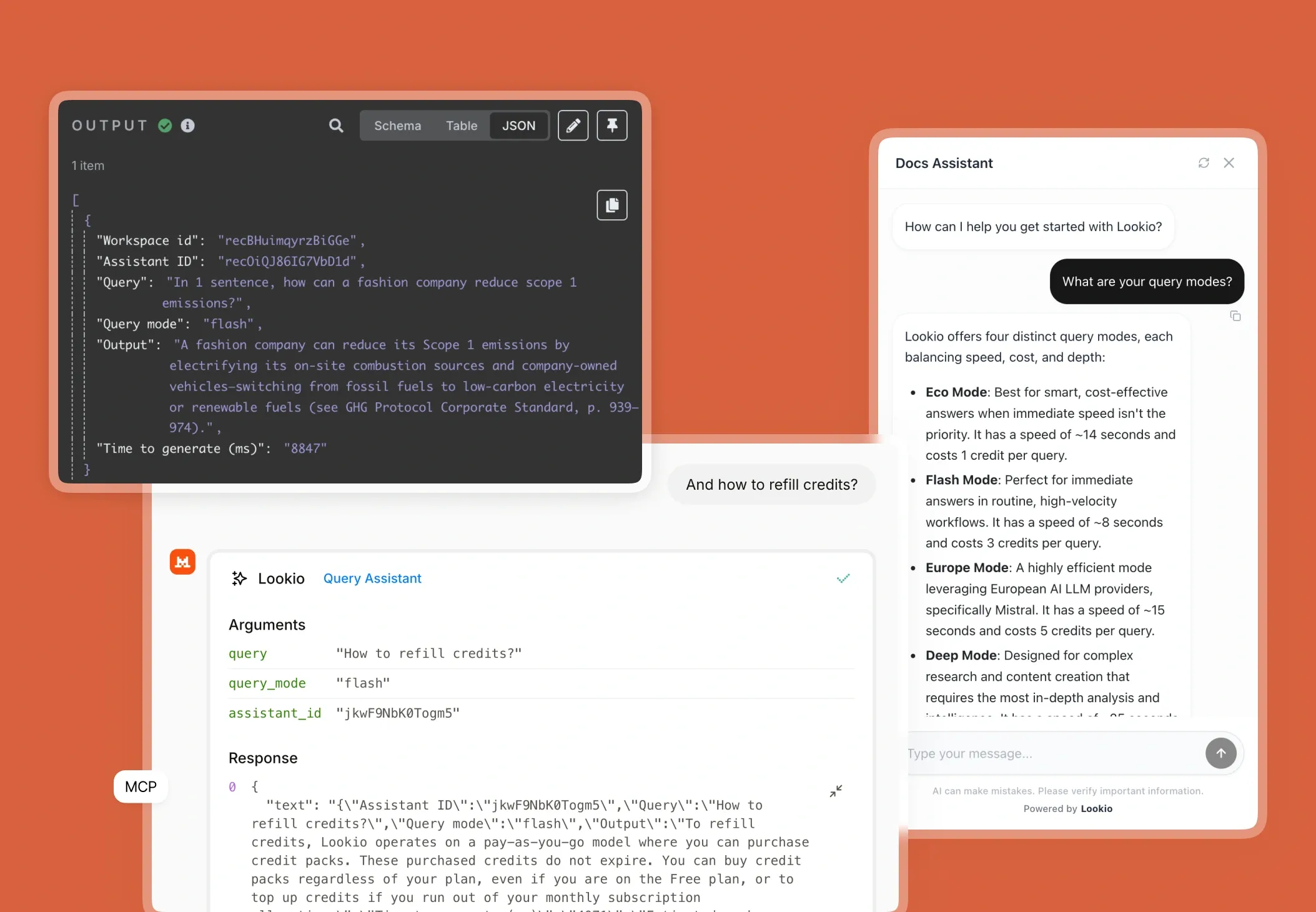
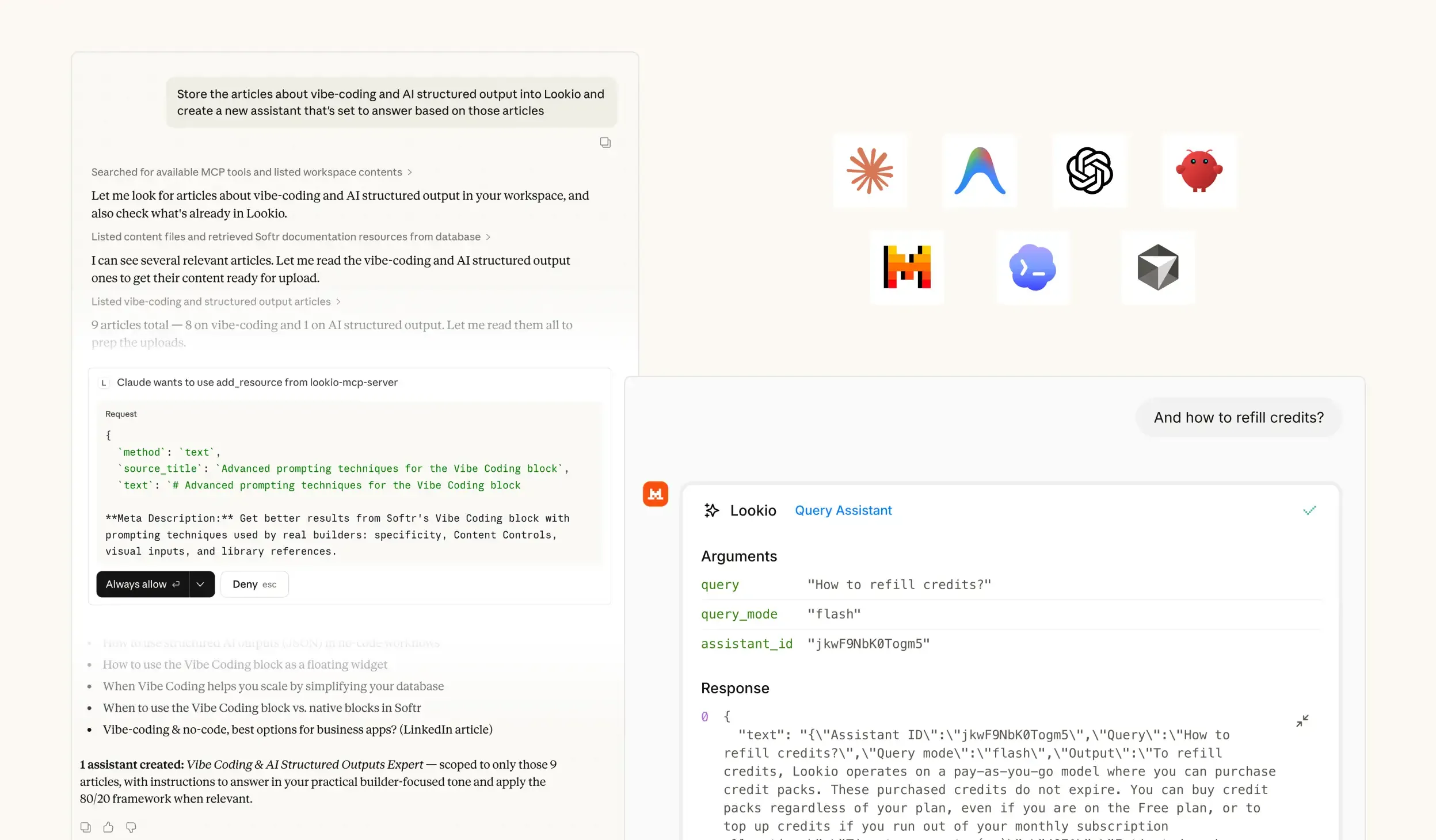
MCP Support for Agents - RAG platform
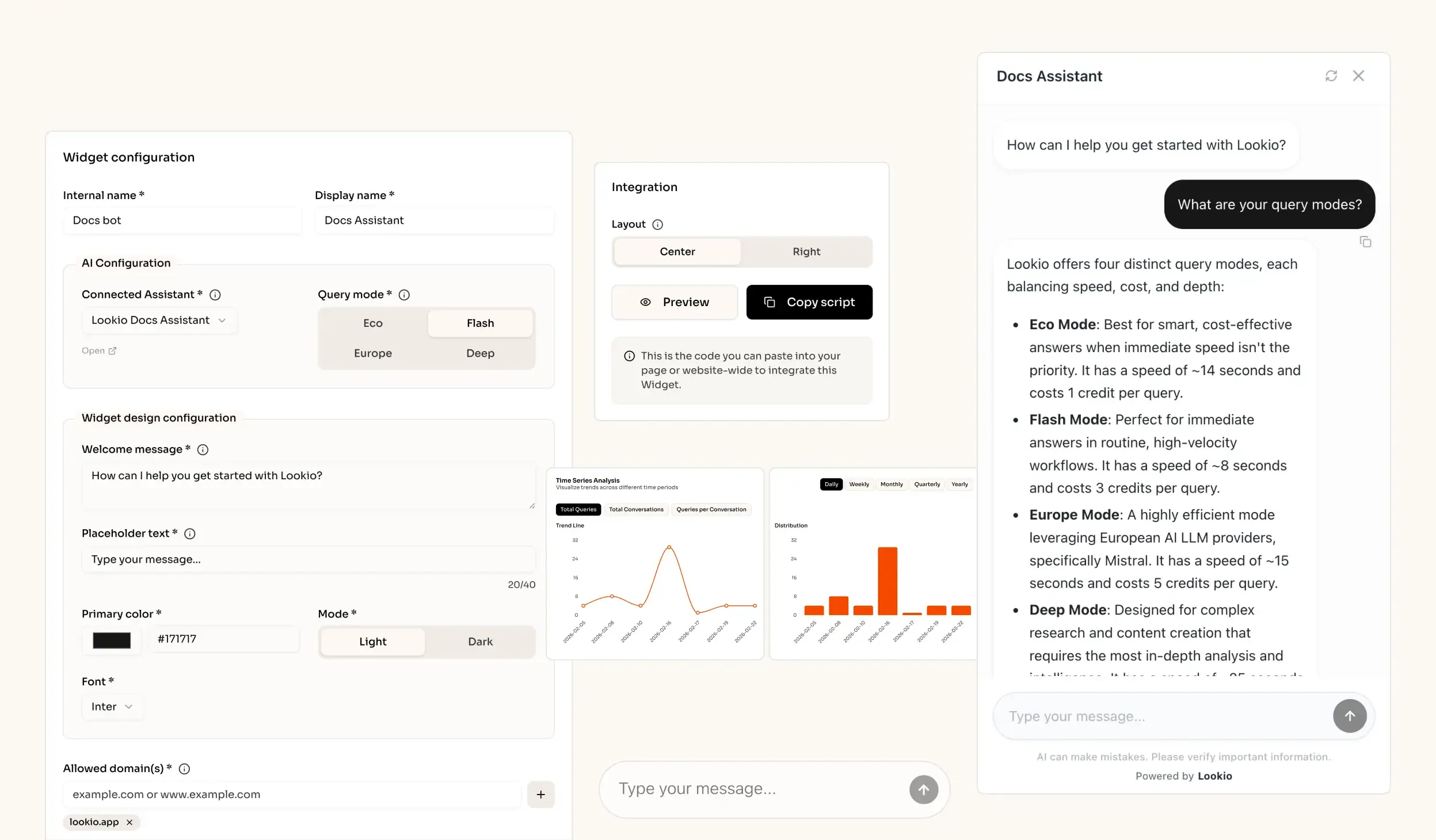
AI knowledge retrieval website widget - RAG solution

The challenge of scaling business development

When a Business Development Representative (BDR) tries to move beyond generic templates, they hit a wall of manual research. To write a truly compelling pitch, you need to reference specific case studies, technical whitepapers, and internal sales playbooks that prove you can solve a prospect’s unique pain point. But finding those needles in the corporate haystack takes hours, forcing teams to choose between outreach volume and outreach quality.

The daily cost of shallow prospecting

Without instant access to the right data, your BD team defaults to 'spam-like' behavior. This disconnect results in lower response rates, wasted lead lists, and a significant SLA risk when responding to technical inbound inquiries. When a prospect asks, "How does your solution handle X?", waiting 24 hours for an expert interruption internally often means losing the deal to a faster competitor. Your most valuable assets - your proprietary insights and successful historical data - are effectively locked in PDFs and forgotten Google Drive folders.

Why the tools they've tried fall short

Most teams have already attempted to fix this with surface-level tools, only to find they cannot support professional workflows:

  • Internal wikis and manual search: These tools rely on keyword matching. If the prospect uses different terminology than your internal documentation, the search fails. This doesn't scale under the pressure of generating high-quality content at scale.
  • Generic AI (ChatGPT): While useful for grammar, ChatGPT doesn't know your business. Without a grounded knowledge base, it hallucinates technical details, creating a massive liability during sales conversations.
  • No-API tools like NotebookLM: These experimental apps are great for a single person's notes, but they are a dead end for teams. There is no way to connect them to your CRM, Slack, or automation platforms like Make. When NotebookLM has no API, it remains a manual silo rather than a business tool.

What's missing is a programmatic bridge that connects your expert knowledge directly to your sales automation stack.
The best knowledge retrieval quality for Business Development out of the box

Excellent quality RAG

Our engine provides extremely accurate answers (scored 37/40 on the n8n Arena Eval) with no complex setup needed.

Ease of implementation

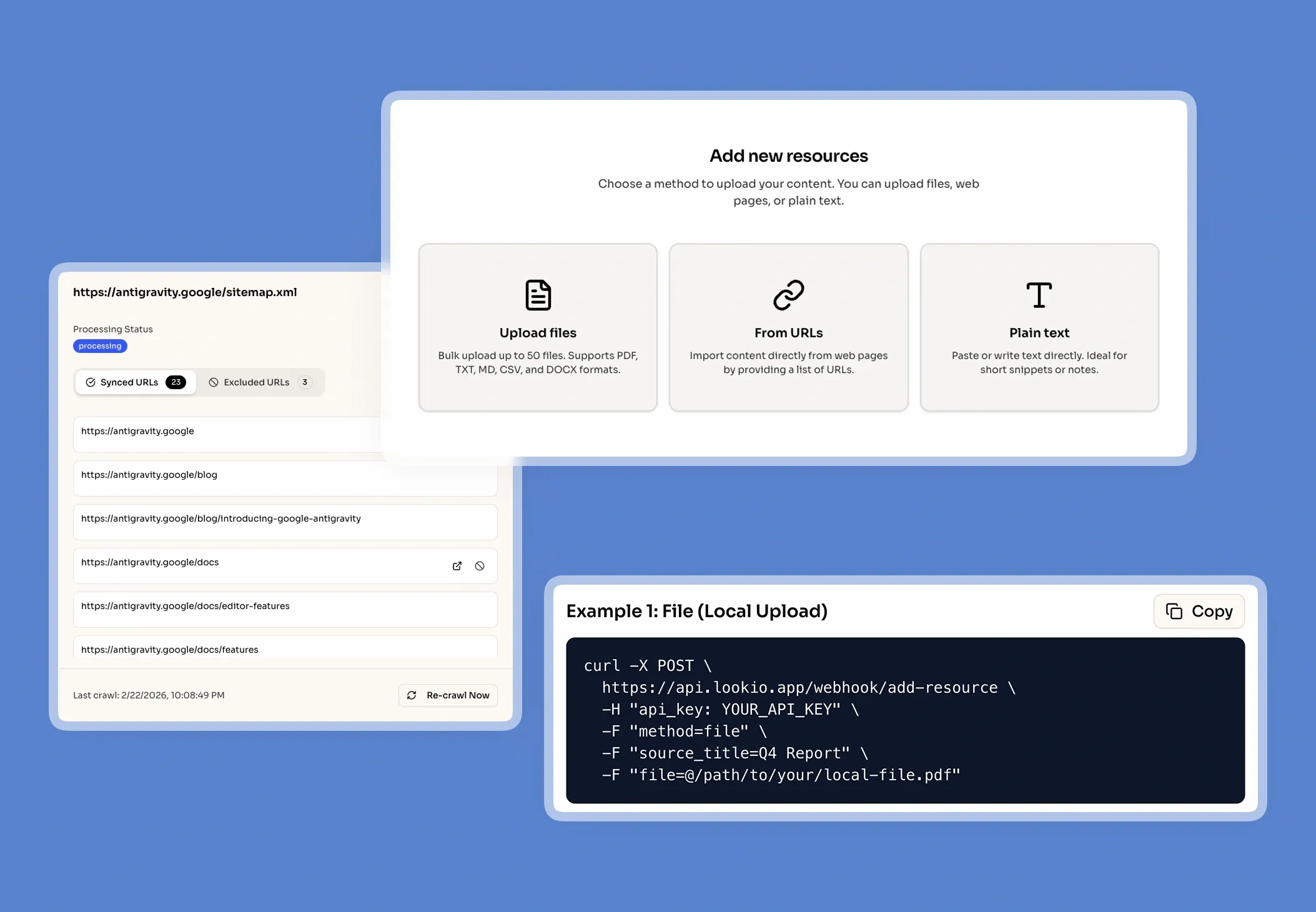
Drop your files into Lookio, create an Assistant, get your API key and start automating (compatible with n8n, Make, Zapier).

Get sourced answers

Lookio integrates a smart metadata system that ensures that the output of your queries are sourced.

Adapts to your data

When you upload PDFs into Lookio, our technology automatically cleans your data to make it retrieval-ready.

How knowledge retrieval powers business development

Smart knowledge retrieval, or RAG (Retrieval-Augmented Generation), acts as the brain for your sales operations. Instead of making an AI guess based on its training data, Lookio forces the model to fetch and use only your verified documents.

What smart knowledge retrieval actually does

Think of it like an automated librarian for your sales team. When you query the system about a specific industry use case, Lookio processes your files into smart searchable chunks, retrieves the exact few paragraphs that match the prospect's query, and hands them to the AI to draft a response. This ensures every claim made in an email or chat is fully sourced and 100% accurate. This is the only way to genuinely train an AI chatbot on your company knowledge without the risks of generic hallucination.

A real scenario for business development

Imagine a prospect from a niche industry signs up. Instead of a rep searching through a 100-page dossier, your automation calls the Lookio API. Lookio instantly retrieves a relevant case study from three years ago and returns a bulleted list of quantified wins for that specific industry. Your lead receives a hyper-relevant email in under two minutes, while your competitor is still searching their 'Sales_Resources' folder.

Connect it to how you already work

Lookio is designed to fit into any sales tech stack through four paths:

  • Via API: Integrate knowledge retrieval directly into n8n or Make to enrich your CRM entries automatically.
  • Via Embeddable Widget: Give your sales team a dedicated "Assistant Panel" on their internal dashboard for instant data lookups during calls using a simple website widget.
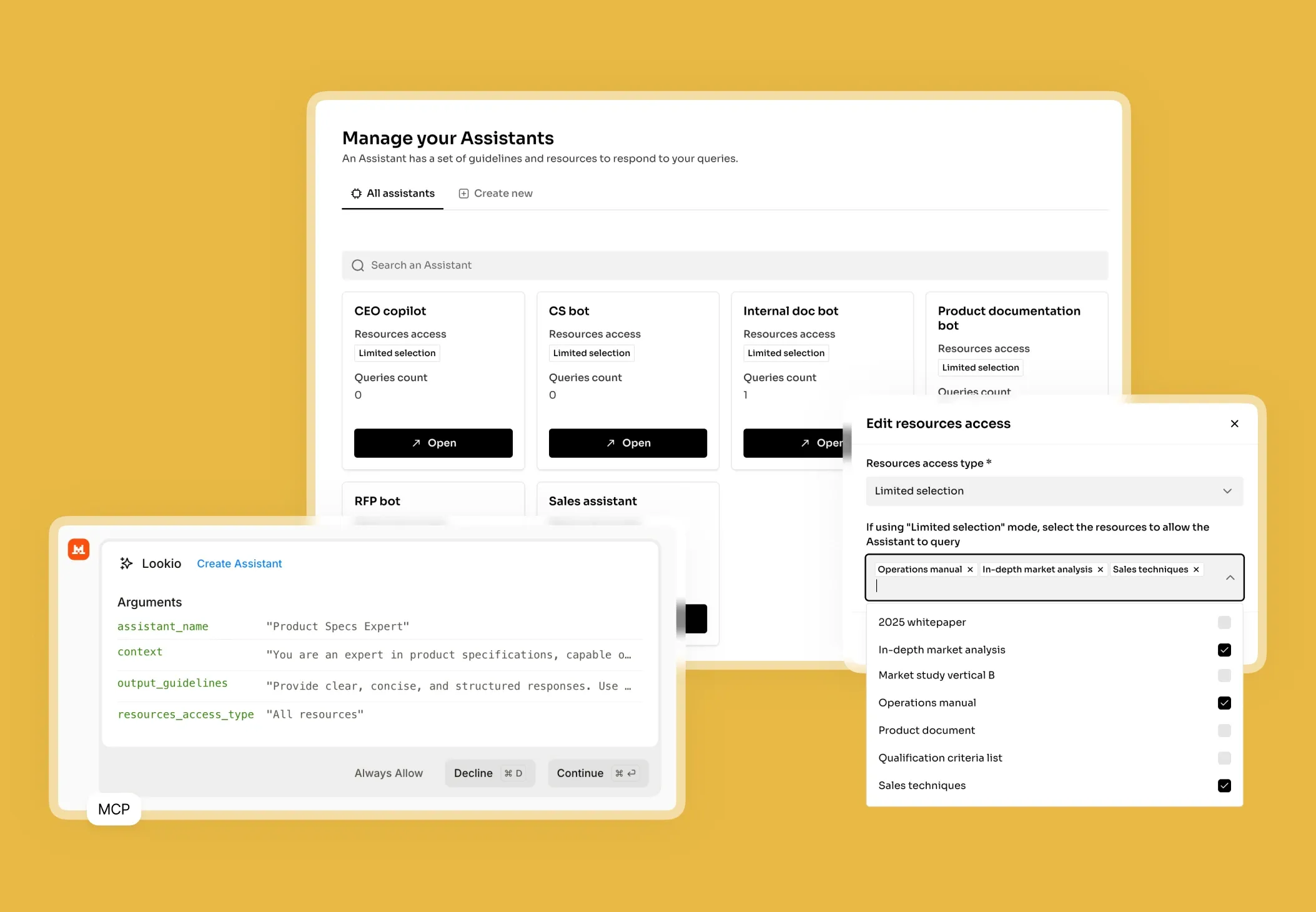
  • Via MCP Server: Connect your sales knowledge to Claude Desktop, allowing agents to browse your resource library and write drafts natively with access to the latest product specs.
  • Via CLI: Use the terminal to run bulk RAG queries for high-volume list cleaning, using the native --json flag for machine-readable insights.

Lookio wins because it combines this API-first architecture with precision vector search. You get the intelligence of a senior partner with the programmatic speed of a script, providing a scalable alternative to custom GPTs that actually work for businesses.

Go from document to automated expertise in 3 simple steps

1. Upload your
knowledge documents

Securely upload your company's core documents (PDFs, URLs, CSVs, sitemaps) to prepare a knowledge base.

Upload my documents →
Upload your knowledge documents

2. Configure Your
Assistants

Create intelligent Assistants and configure their instructions, context, and access to documents.

Create an Assistant →
Configure Your Assistants

3. Get Answers &
Automate

Query your Assistants via the API, add them as widget to your website, or let your agents use them via MCP.

See the API documentation →
Get Answers & Automate

Use the query modes that fit your use case

Eco Mode

~14s response time

Best for smart, cost-effective answers when immediate speed isn't the priority

Flash Mode

~6s response time

Perfect for getting immediate answers in routine, high-velocity workflows

Europe Mode

~15s response time

Highly efficient mode leveraging European AI LLM providers, precisely Mistral

Deep Mode

~25s response time

Designed for complex research and content creation requiring in-depth analysis

Building your solution and making it production-ready

Implementation starts with your data. For Business Development, don't just upload generic brochures. Gather your battlecards, technical spec sheets, localized case studies, and internal Q&A logs. Lookio supports PDF, Docx, and CSV, but for live product updates, use the Sitemap Syncing feature to keep your assistant's knowledge current with your public documentation.

Configure your AI Assistant

Once your data is uploaded, you must define the Assistant’s persona. A typical system prompt for this use case would be: "You are an expert Sales Engineer. Use only the provided documents to find proof points and technical specifications. If a specific claim isn't in the docs, state that the information is unavailable rather than guessing."

Choosing the right Query Mode is critical for balancing cost and speed:

  • Flash (3 credits, ~8s): Perfect for real-time sales support bots or internal Slack lookup tools.
  • Deep (20 credits, ~25s): Use this for generating high-stakes outbound emails or complex project proposals where precision is non-negotiable.
  • Eco (1 credit, ~14s): Best for batch-processing lead lists where time isn’t a factor.

Integrate and optimise your workflow

Most BD teams thrive by connecting Lookio to RAG-powered agents in n8n. You can trigger a query the moment a new lead is added to your CRM, and have the Lookio output populate a 'Context' field for the rep. Monitor credit usage in the Lookio dashboard to see which assistants or API keys are driving the most value for your outreach strategy.

Mistakes that kill retrieval quality

  • The "Everything Bagel" mistake: Don’t put HR policies and sales battlecards in the same assistant. Narrow the search space to keep results sharp.
  • Vague system prompts: Avoid saying "be helpful." Instead, tell the assistant to "focus on quantified metrics like ROI and time-to-value found in the text."
  • Ignoring source formatting: Ensure your CSV or PDF layouts are clean. If the AI can't parse the headings, it can't find the answers.

By following these steps, you can build an AI support chatbot or sales assistant that actually moves the needle on revenue, rather than just adding more noise to the inbox.

Frequently Asked Questions about Lookio

What is Lookio?

Lookio is an advanced AI platform that allows you to build intelligent assistants using your own company documents as a dedicated knowledge base. It uses a technology called Retrieval-Augmented Generation (RAG) to provide precise, sourced answers to complex questions by searching exclusively through the files you provide. This enables companies to create expert AI systems for tasks like customer support, content creation, and workflow automation without needing to build the technology from scratch.

What is the difference between NotebookLM and Lookio?

NotebookLM and Lookio both use sophisticated RAG technology to transform documents into intelligent, conversational knowledge bases. The primary and most critical difference between them is that NotebookLM lacks an API (Application Programming Interface). This lack of an API makes NotebookLM suitable for individuals or small teams but unsuitable for businesses that need to scale. Lookio, conversely, is an "API-first" platform. This means it provides the same intelligent document-understanding capabilities as NotebookLM but is specifically designed for business integration, allowing companies to automate workflows, integrate knowledge retrieval into existing tools like Slack, and build custom solutions.

Can I add an AI chat widget to my own website?

Yes! Lookio Widgets allow you to integrate one of your Assistants into a modern chat widget that appears on your website, documentation platform (like Mintlify), or internal tools. • Significant Cost Savings: Lookio's "pay-as-you-go" credit model starts at approximately €0.02 per query, compared to €0.20 to €0.50 for native AI assistants on standard documentation platforms. • Hybrid Knowledge Base: Unlike most documentation assistants that only use your docs, Lookio allows you to sync additional articles, proprietary documents, and dedicated Q&As to provide more comprehensive answers. • Fast Integration: In just a few clicks, you get a 6-line script to add to your website to enable the widget.

How does Lookio keep its knowledge up-to-date?

Beyond individual uploads, Lookio supports Sitemap Syncing. Simply provide your website's sitemap URL, and Lookio will automatically detect new pages and re-crawl existing ones when they are updated. This ensures your assistants always have access to the latest version of your content without manual work. You can also use Exclusion RegEx—with the help of our built-in AI RegEx Helper—to precisely control which pages are indexed.

Can I use Lookio with AI agents like Claude or ChatGPT?

Yes. Use the Lookio MCP Server to connect your workspace to agents like Claude Desktop or Antigravity. This allows you to run queries, manage resources, and build assistants directly within your agent's conversation using your workspace API key. For headless or autonomous agents, you can also leverage our robust REST API or the Lookio CLI.

How does Lookio's pricing work?

Our pricing is designed for flexibility, combining subscription plans with a pay-as-you-go credit system. 1. Subscription Plans (Free, Starter, Pro): Your plan determines your Knowledge Base Limit (total words stored). Paid plans also include a monthly bundle of credits at a discounted rate. 2. Credit Packs: Credits power your queries. You can purchase credit packs at any time to top up your balance. Credits bought in packs never expire. This hybrid model allows you to pay for storage capacity and active usage separately, ensuring you only pay for what you need.

Can I try Lookio for free?

Absolutely. Every new account starts on our Free plan, which includes 100 free credits to explore the platform's full capabilities without needing a credit card. You can build an assistant, upload documents, and test both the chat interface and the API.

100 welcome credits - no credit card required

Ready to unlock your company's knowledge?

Create a free account →