FREE
100 credits offered · No subscription needed

Build knowledge-based AI Assistants. Call them via API.

Instantly access internal product research, quality standards, and regulatory documentation to accelerate business workflows.

Get started free
Lookio AI painterly background
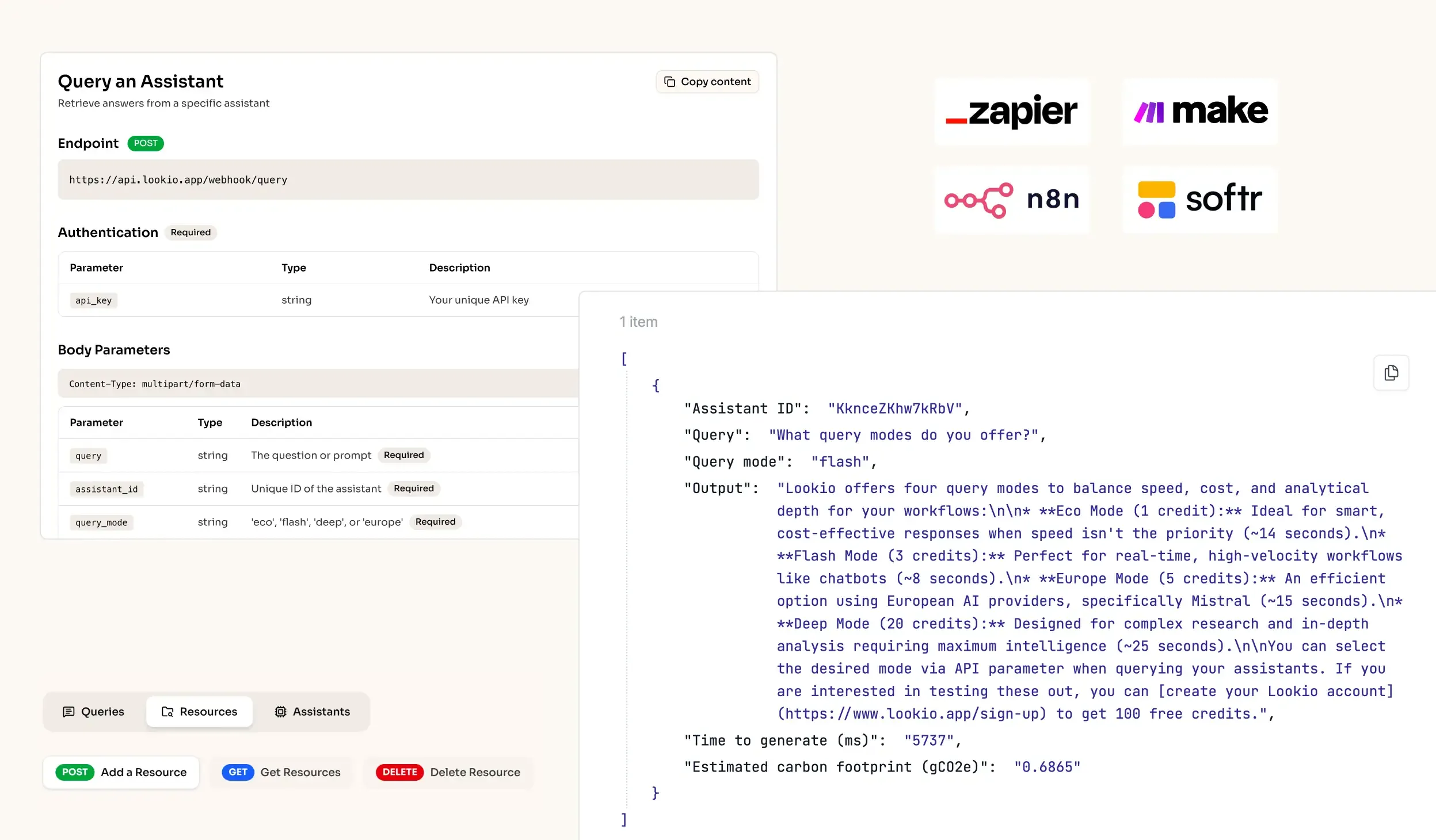
API Integration for RAG AI knowledge retrieval in workflows
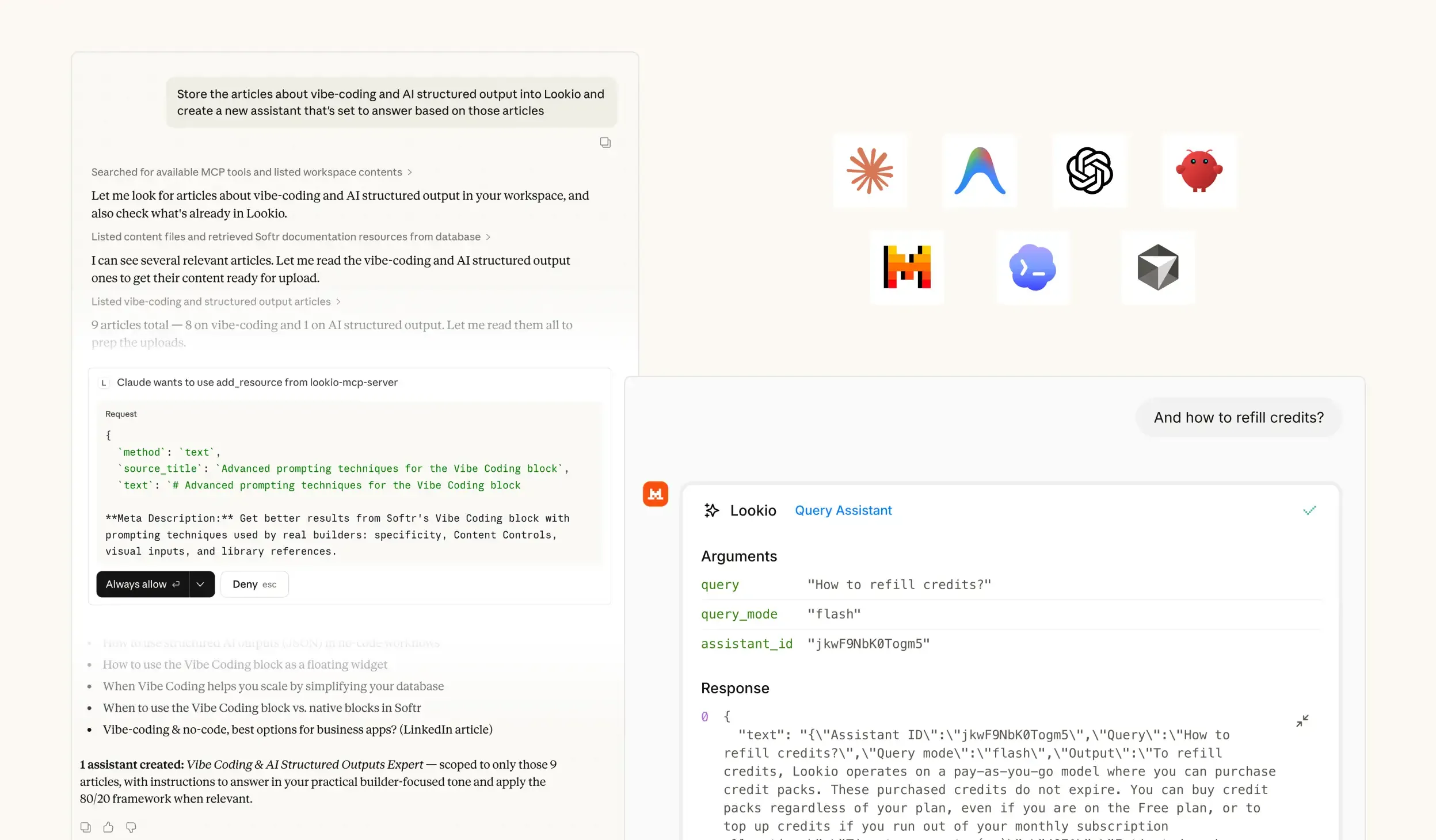
MCP Support for Agents - RAG platform
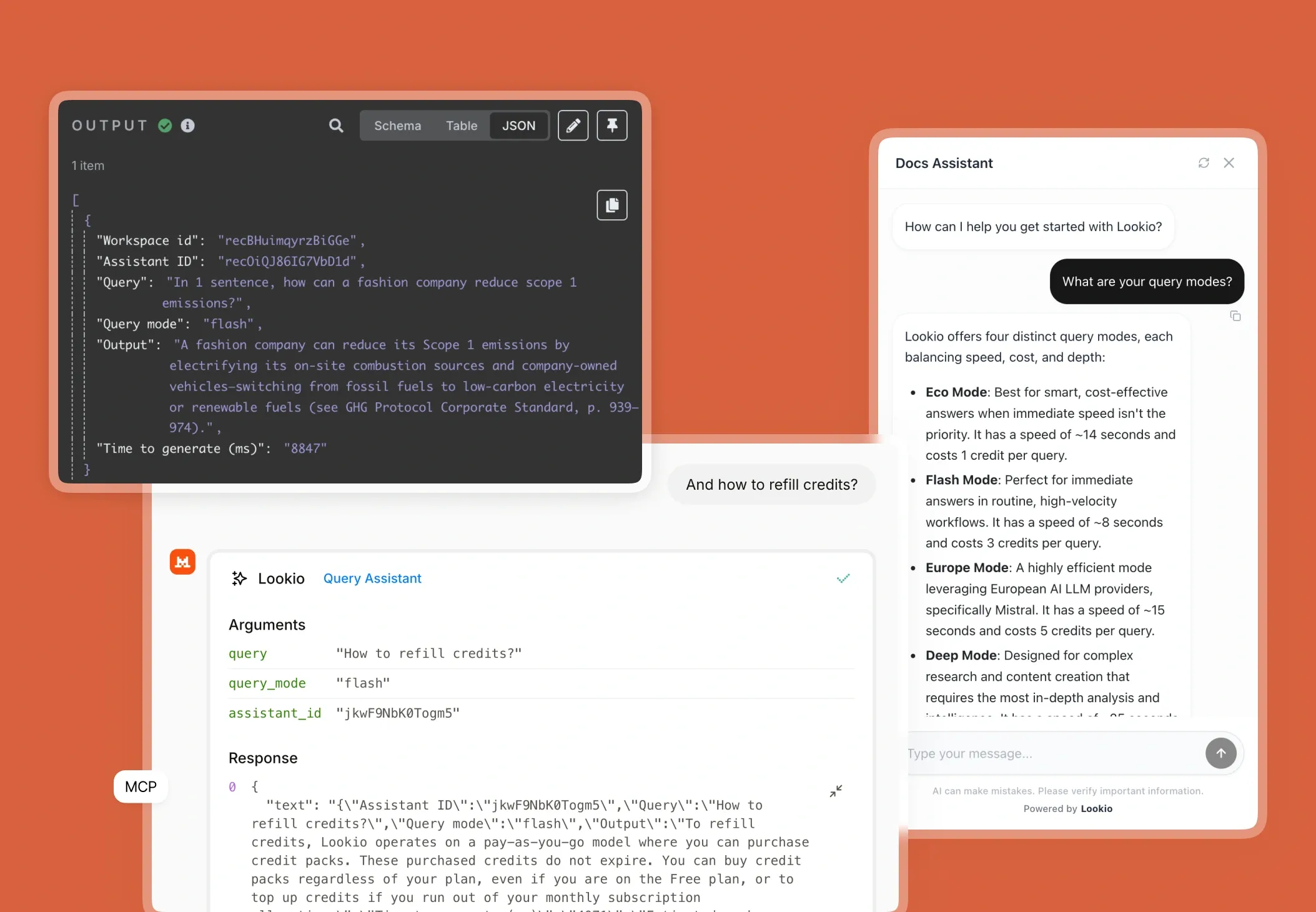
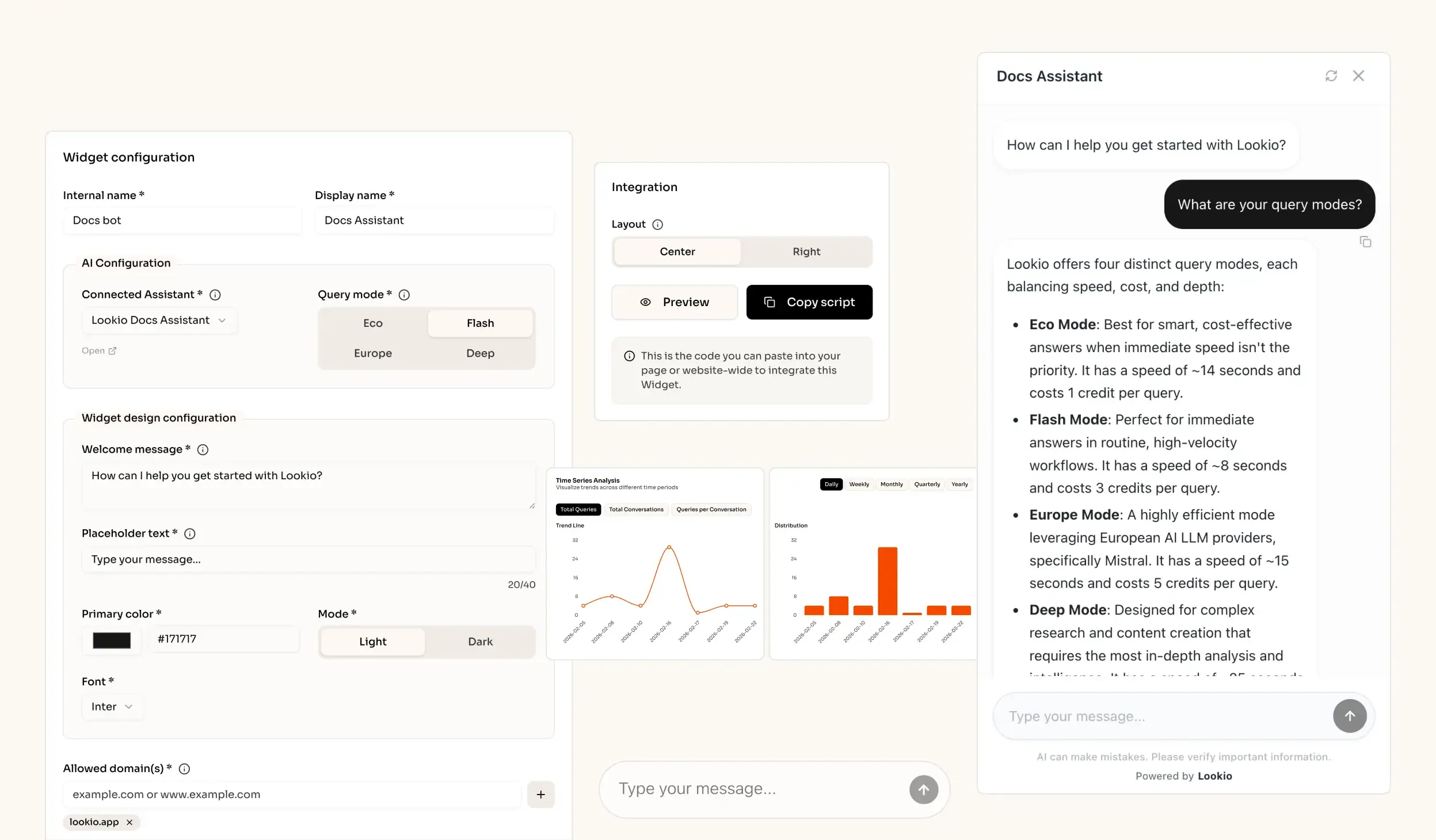
AI knowledge retrieval website widget - RAG solution

The challenge of information silos in food and beverage companies

When a quality assurance manager or brand marketer in the food and beverage industry tries to verify a specific formulation detail or check a compliance standard, they hit a wall of unstructured data. These teams sit on a goldmine of PDF technical sheets, supply chain audits, and internal regulatory wikis, but retrieving a specific fact often involves digging through nested folders or interrupting the product development lead.

The daily cost of hidden expertise

In a fast-moving industry, the cost of fragmented knowledge is measured in delayed product launches and high support overhead. When customer service teams cannot instantly answer a complex consumer query about allergens or ingredient sourcing, they must escalate the ticket, directly impacting SLA performance. Similarly, marketers often produce generic copy because the unique proprietary insights, like specific harvest methods or organic certification nuances, are buried in dense manuals where they remain unused.

Why the tools they've tried fall short

Most companies attempt to fix this with surface-level search tools or generic AI, which frequently backfire in a professional environment:

  • Basic internal wikis or CSV searches: These rely on exact keyword matching. If your query is "low sugar options" but the document labels them as "sugar-reduced formulations," standard search fails. This trains AI chatbots on company knowledge poorly because the system doesn't actually understand the context.
  • Generic LLMs (ChatGPT): Without a ground-truth knowledge base, generic AI is prone to hallucination. For a food brand, hallucinating a nutrition fact or a safety standard is a massive liability.
  • No-API tools like NotebookLM: While Google's tool is great for research, the fact that NotebookLM lacks an API makes it a dead end for business software. You cannot bridge it to your helpdesk, your n8n workflows, or your website.

What's missing is a programmatic bridge between your technical documents and your day-to-day business tools.
The best knowledge retrieval quality for Food & Beverage Companies out of the box

Excellent quality RAG

Our engine provides extremely accurate answers (scored 37/40 on the n8n Arena Eval) with no complex setup needed.

Ease of implementation

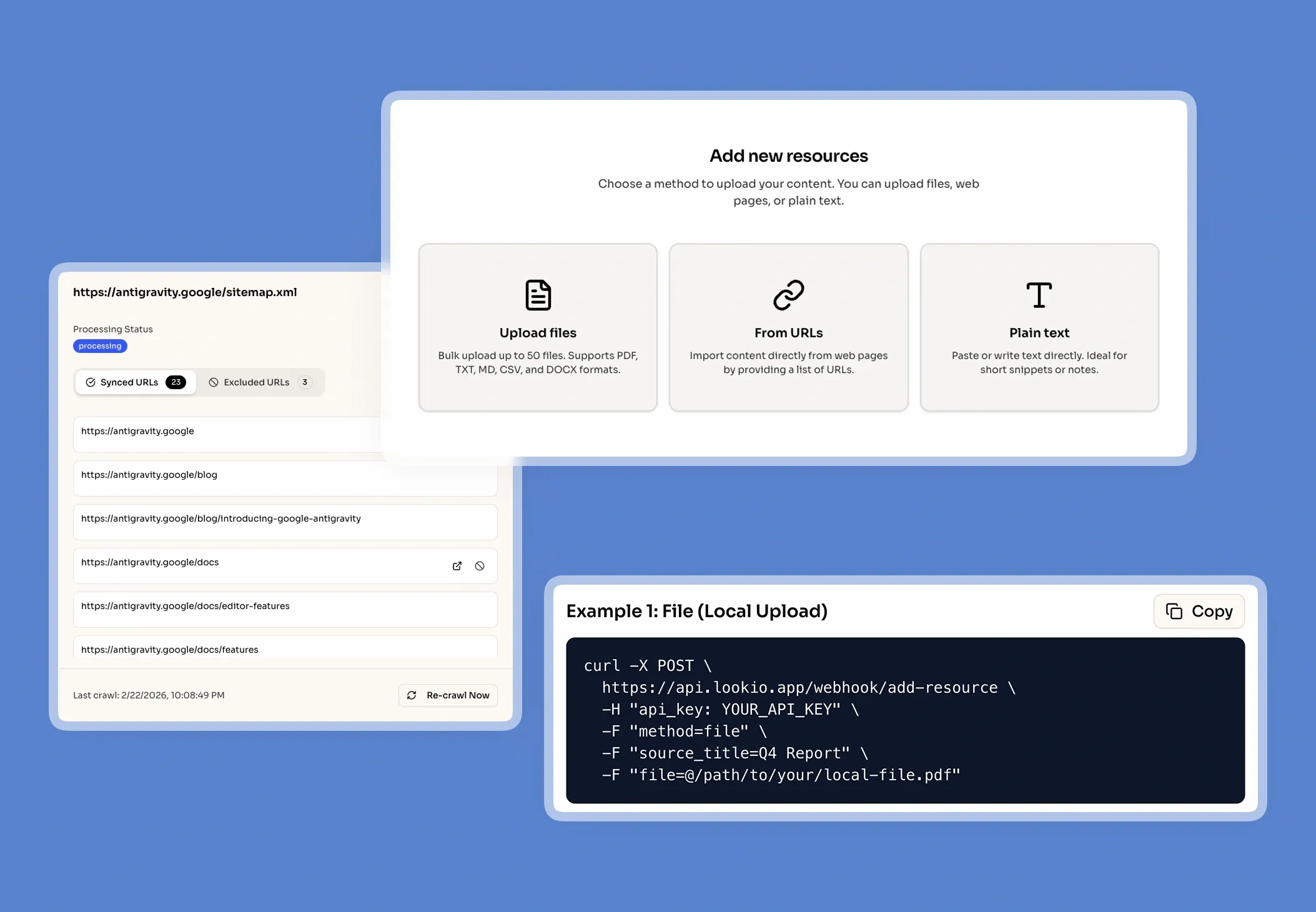
Drop your files into Lookio, create an Assistant, get your API key and start automating (compatible with n8n, Make, Zapier).

Get sourced answers

Lookio integrates a smart metadata system that ensures that the output of your queries are sourced.

Adapts to your data

When you upload PDFs into Lookio, our technology automatically cleans your data to make it retrieval-ready.

How knowledge retrieval powers food and beverage workflows

What smart knowledge retrieval actually does

Knowledge retrieval, specifically RAG (Retrieval-Augmented Generation), turns your static documents into an interactive brain. Instead of asking an AI to guess an answer, Lookio processes your PDFs and sitemaps into searchable chunks. When you ask a question, the system finds only the relevant paragraphs and feeds them to the AI as the source of truth. Think of it like a senior food scientist who has memorized every SKU's technical sheet; they don't speculate, they simply cite the exact section of the manual that applies.

A real scenario for product teams

Imagine a marketing manager writing an SEO article about organic sourcing. Instead of manual research, they trigger a Lookio query via API. Lookio searches the internal "Sourcing 2024" PDF, retrieves the specific audit results, and returns the facts directly to their writing tool. This allows companies to scale SEO content with AI while maintaining total factual accuracy. This approach is significantly more effective than traditional Custom GPT alternatives because it integrates directly into production pipelines.

Connect it to how you already work

Lookio isn't another destination you have to log into; it lives wherever your data is needed through four integration paths:

  • Via API: Automate mass document checks or build complex RAG agents in Make or n8n.
  • Via Embeddable Widget: Drop a sourced chat interface onto your internal employee portal or public FAQ page in minutes.
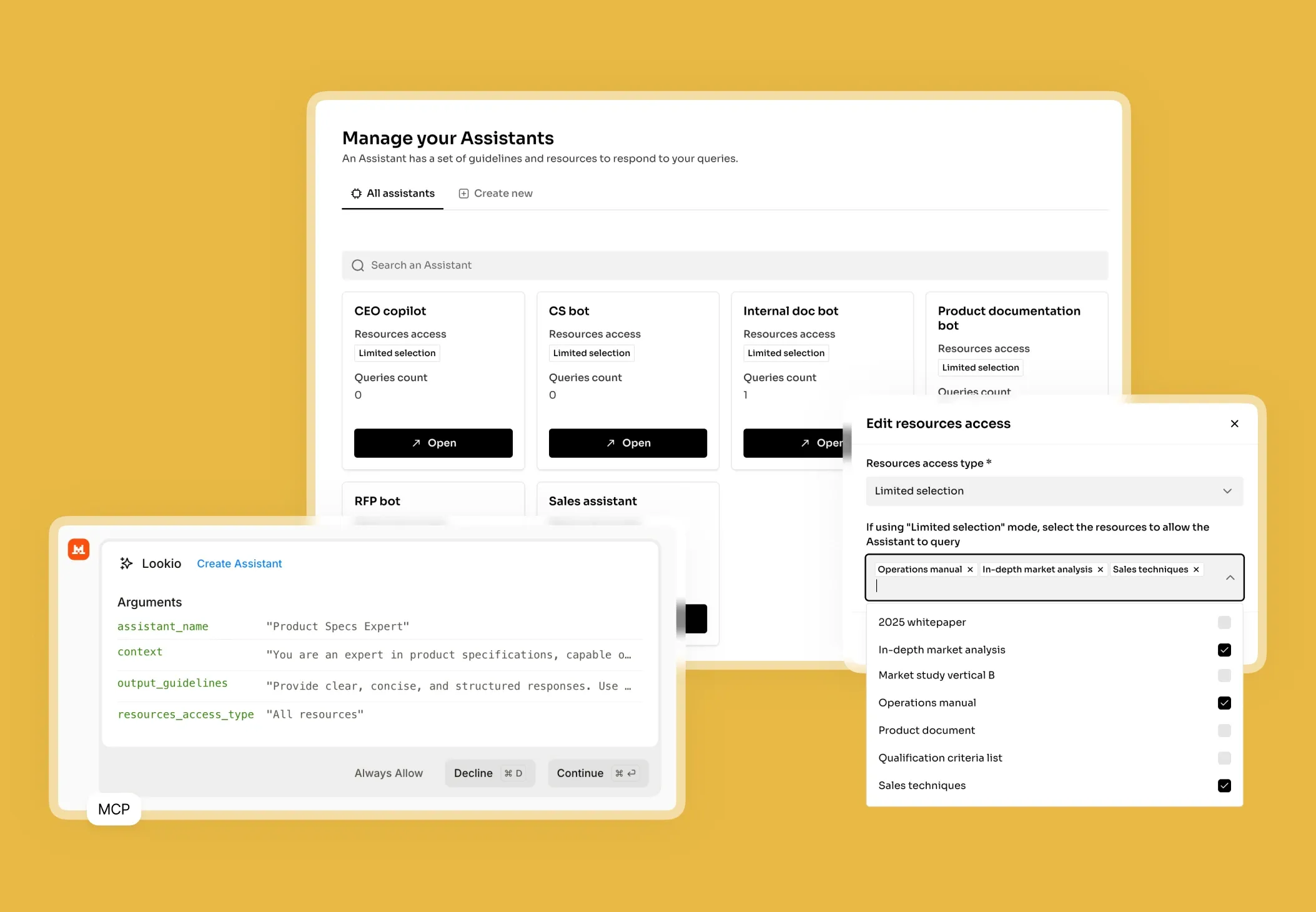
  • Via MCP Server: Connect your Lookio knowledge base to AI agents like Claude, allowing them to read your technical documents as they write reports.
  • Via CLI: Use the terminal to upload new allergen spreadsheets or query product data with a native --json flag for clean data processing.

The Lookio advantage

Lookio wins because it combines high-precision vector search with a developer-first architecture. While other tools are closed ecosystems, Lookio is designed to be the intelligence layer that powers your existing software, ensuring your documentation finally collects the dividends it deserves.

Go from document to automated expertise in 3 simple steps

1. Upload your
knowledge documents

Securely upload your company's core documents (PDFs, URLs, CSVs, sitemaps) to prepare a knowledge base.

Upload my documents →
Upload your knowledge documents

2. Configure Your
Assistants

Create intelligent Assistants and configure their instructions, context, and access to documents.

Create an Assistant →
Configure Your Assistants

3. Get Answers &
Automate

Query your Assistants via the API, add them as widget to your website, or let your agents use them via MCP.

See the API documentation →
Get Answers & Automate

Use the query modes that fit your use case

Eco Mode

~14s response time

Best for smart, cost-effective answers when immediate speed isn't the priority

Flash Mode

~6s response time

Perfect for getting immediate answers in routine, high-velocity workflows

Europe Mode

~15s response time

Highly efficient mode leveraging European AI LLM providers, precisely Mistral

Deep Mode

~25s response time

Designed for complex research and content creation requiring in-depth analysis

Building your solution and making it production-ready

Step 1: Connect clean data

Begin by gathering your most valuable assets: ingredient specifications, QA protocols, sustainability reports, and SKU catalogs. Lookio supports PDFs, CSVs, and even Sitemap Syncing, which is perfect for companies with extensive public documentation. We recommend organizing these into focused Assistants. For example, create a "Regulatory Compliance Assistant" for one set of docs and a "Customer FAQ Assistant" for another. This narrows the search space and improves accuracy.

Step 2: Configure your Assistant

In the Lookio dashboard, you will define the instructions for your Assistant. A specialized system prompt for this use case might look like: "You are a technical specialist for a food brand. Answer using only the provided technical sheets. Always cite the product code and document name. If the information is not present, state that you cannot find the answer in the internal records."

Choose the right Query Mode for your needs:

  • Flash Mode (3 credits, ~6s): Use this to add an AI chatbot widget to your site for real-time customer support.
  • Deep Mode (20 credits, ~25s): Best for complex R&D research or when you need to build reliable RAG agents within n8n to draft detailed technical reports.
  • Eco Mode (1 credit, ~14s): Ideal for bulk processing thousands of simple ingredient checks via CSV.

Step 3: Integrate and optimize

Once configured, use the Lookio API to hook your Assistant into your helpdesk (e.g., Zendesk or Intercom) or internal Slack channels. Monitor your usage via the dashboard to see which assistants are providing the most value. To ensure success, avoid these common industry mistakes:

  • Vague Prompts: Avoid telling the AI to "be helpful"; instead, provide a clear role like "Technical Auditor."
  • Dataset Bloat: Don't mix unrelated topics. Keep supply chain docs separate from brand identity guides to ensure the vector search finds the right context.
  • Context Overload: Instead of feeding an LLM everything, let the AI support chatbot retrieve only the relevant snippets, which keeps costs down and accuracy high.

Frequently Asked Questions about Lookio

What is Lookio?

Lookio is an advanced AI platform that allows you to build intelligent assistants using your own company documents as a dedicated knowledge base. It uses a technology called Retrieval-Augmented Generation (RAG) to provide precise, sourced answers to complex questions by searching exclusively through the files you provide. This enables companies to create expert AI systems for tasks like customer support, content creation, and workflow automation without needing to build the technology from scratch.

What is the difference between NotebookLM and Lookio?

NotebookLM and Lookio both use sophisticated RAG technology to transform documents into intelligent, conversational knowledge bases. The primary and most critical difference between them is that NotebookLM lacks an API (Application Programming Interface). This lack of an API makes NotebookLM suitable for individuals or small teams but unsuitable for businesses that need to scale. Lookio, conversely, is an "API-first" platform. This means it provides the same intelligent document-understanding capabilities as NotebookLM but is specifically designed for business integration, allowing companies to automate workflows, integrate knowledge retrieval into existing tools like Slack, and build custom solutions.

Can I add an AI chat widget to my own website?

Yes! Lookio Widgets allow you to integrate one of your Assistants into a modern chat widget that appears on your website, documentation platform (like Mintlify), or internal tools. • Significant Cost Savings: Lookio's "pay-as-you-go" credit model starts at approximately €0.02 per query, compared to €0.20 to €0.50 for native AI assistants on standard documentation platforms. • Hybrid Knowledge Base: Unlike most documentation assistants that only use your docs, Lookio allows you to sync additional articles, proprietary documents, and dedicated Q&As to provide more comprehensive answers. • Fast Integration: In just a few clicks, you get a 6-line script to add to your website to enable the widget.

How does Lookio keep its knowledge up-to-date?

Beyond individual uploads, Lookio supports Sitemap Syncing. Simply provide your website's sitemap URL, and Lookio will automatically detect new pages and re-crawl existing ones when they are updated. This ensures your assistants always have access to the latest version of your content without manual work. You can also use Exclusion RegEx—with the help of our built-in AI RegEx Helper—to precisely control which pages are indexed.

Can I use Lookio with AI agents like Claude or ChatGPT?

Yes. Use the Lookio MCP Server to connect your workspace to agents like Claude Desktop or Antigravity. This allows you to run queries, manage resources, and build assistants directly within your agent's conversation using your workspace API key. For headless or autonomous agents, you can also leverage our robust REST API or the Lookio CLI.

How does Lookio's pricing work?

Our pricing is designed for flexibility, combining subscription plans with a pay-as-you-go credit system. 1. Subscription Plans (Free, Starter, Pro): Your plan determines your Knowledge Base Limit (total words stored). Paid plans also include a monthly bundle of credits at a discounted rate. 2. Credit Packs: Credits power your queries. You can purchase credit packs at any time to top up your balance. Credits bought in packs never expire. This hybrid model allows you to pay for storage capacity and active usage separately, ensuring you only pay for what you need.

Can I try Lookio for free?

Absolutely. Every new account starts on our Free plan, which includes 100 free credits to explore the platform's full capabilities without needing a credit card. You can build an assistant, upload documents, and test both the chat interface and the API.

100 welcome credits - no credit card required

Ready to connect your company knowledge?

Create a free account →