
The company knowledge problem is not storage. It’s retrieval. Most businesses already have the documentation they need. What they lack is a reliable way to get precise answers out of it without interrupting a human expert.
Imagine these scenarios:
- A Marketing Manager needs to write an article about a complex industry regulation. Instead of bothering the legal team, they query the “Company Brain” and get a fact-checked summary with direct citations.
- A Sales Rep is preparing a proposal and needs to find a specific case study from 2023. They ask the AI and get the relevant proof points in seconds.
- A Support Agent is handling a rare edge case. The AI scans 500 pages of technical manuals to find the exact error code resolution instantly.
This is the power of AI Knowledge Retrieval. But to get these results, you have to move past “just asking AI” and understand when to use a specialized architecture called RAG.
When does RAG make sense?
You might have heard the term RAG (Retrieval-Augmented Generation). It sounds technical, but it’s actually a very practical solution to a simple problem: AI has a limited attention span.
If you have a short document—say, a 2-page PDF—you don’t need RAG. You can just copy-paste the text directly into ChatGPT or Claude. The AI can “see” everything at once and answer accurately.
However, once your documentation exceeds a certain size (typically 3,000 to 5,000 words), the “pasting method” starts to break for three reasons:
- The Accuracy Drop: When you stuff 50 documents into a prompt, the AI gets overwhelmed. It starts to hallucinate, blending its general training with your specific docs. It sounds confident, but it might miss a crucial “not” or misquote a pricing tier.
- The Cost Trap: You are charged for every word you send to an AI. If you paste your entire 100-page manual into every query, you are paying to “upload” that same manual 50 times a day. It’s economically absurd.
- The Speed Bottleneck: The more you ask an AI to read, the longer it takes to answer. A “smart” lookup becomes a 30-second wait.
RAG is the architecture for scale. Instead of dumping everything into the prompt, RAG works like a librarian: it searches your entire library, finds the 5 most relevant pages, and only gives those to the AI to read.
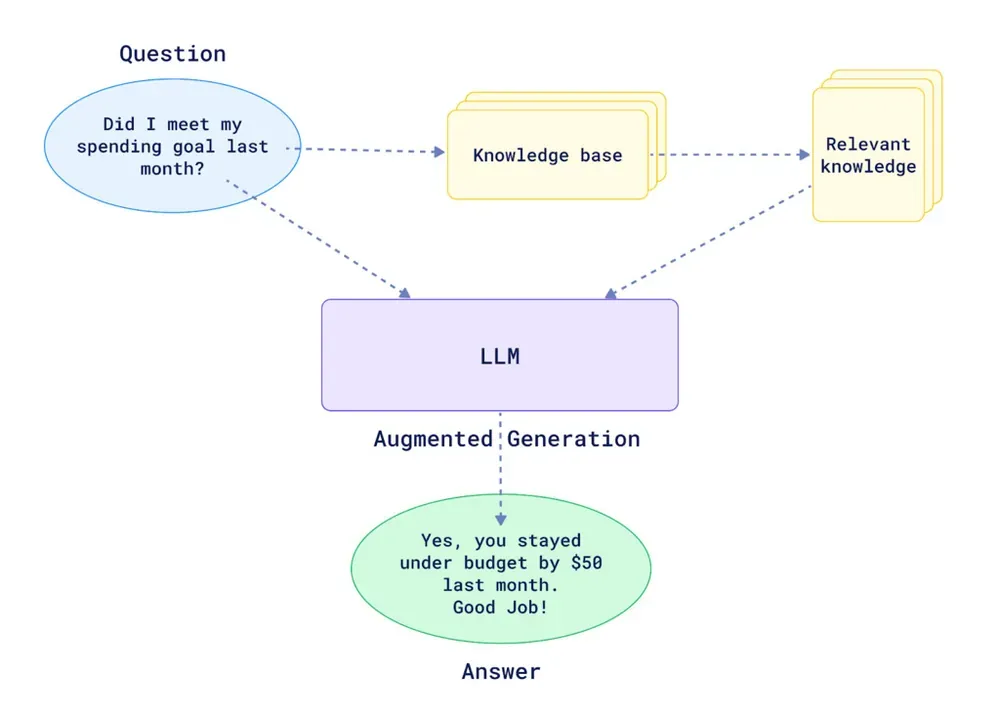
This is the fundamental difference between “chatting with AI” and “querying your company knowledge.” One is a general conversation; the other is a structured, accountable lookup.
Introducing RAG for AI knowledge retrieval
You don’t need to be an engineer to understand how this retrieval process works. It essentially follows three steps:
- Preparation: Your documents are processed and “indexed”—much like a book’s index at the back. We split them into small, manageable snippets so the AI doesn’t get overwhelmed.
- The Search: When you ask a question, the system searches that index for the snippets that match your question’s meaning (not just keywords).
- The Answer: The system hands those few relevant snippets to the AI. The AI reads them and writes an answer based only on that specific information, citing its sources as it goes.
What most companies get wrong when they set this up
Building a RAG system is not hard conceptually. It is hard to build correctly. What I’ve seen consistently, watching companies implement this, is that most of them underestimate the steps between “upload a document” and “get accurate answers.”
The critical failure points:
Poor document quality going in. You cannot retrieve accurately what was never ingested cleanly. Complex PDFs with multi-column layouts, tables, or scanned pages need proper OCR and text extraction before they become useful chunks. A poorly ingested document will appear in your knowledge base but return garbled, out-of-sequence text when retrieved.
One giant assistant for everything. The instinct is to build a single “company brain” that knows everything. In practice, this hurts retrieval precision. A customer support question about a refund policy should not compete for relevance against your engineering specifications or sales playbooks. Focused assistants return more accurate answers because the retrieval pool is tighter.
No source metadata attached to chunks. Without clear titles and source URLs attached to each resource, your answers come back without citations. The user has no way to verify where the answer came from or click through to the original document. This kills trust in the system fast.
Using the wrong query mode for the task. Not all queries require the same depth of reasoning. Defaulting to the fastest mode for a complex research question, or burning expensive credits on a simple lookup, are both wasteful. Matching mode to task is a skill that compounds over time.
How to structure your knowledge base for accurate retrieval
The quality of your answers is largely determined before anyone asks a question. It is determined by how your knowledge base is organized.
Create domain-specific assistants
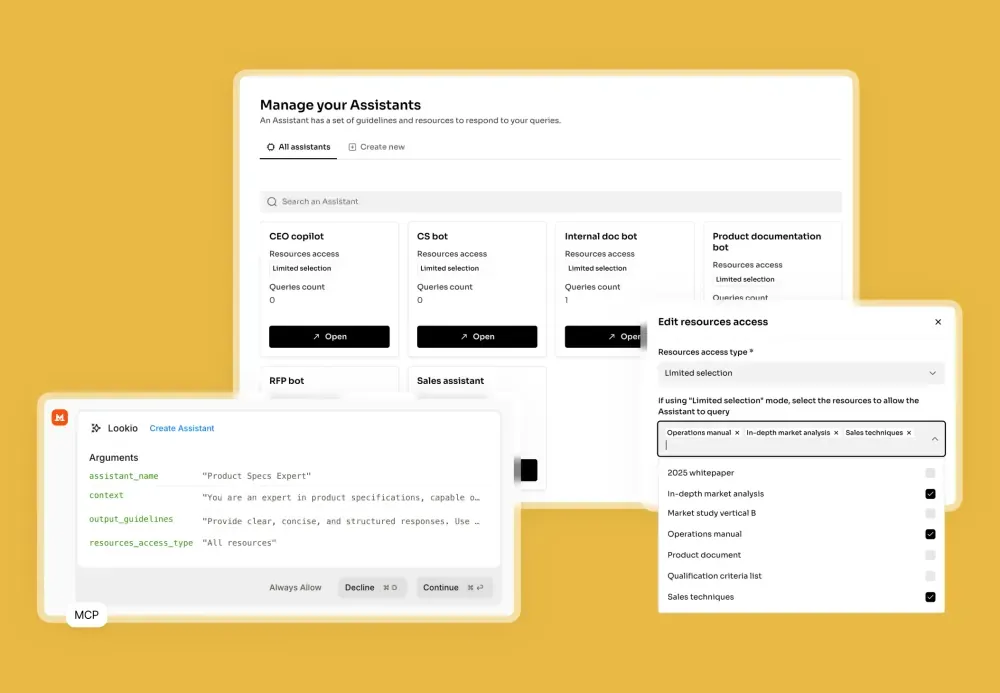
Instead of one assistant with access to everything, build separate assistants for distinct use cases. A few examples:
- Marketing assistant: product documentation, past high-performing articles, brand guidelines, competitor research.
- Support assistant: product FAQs, user guides, known issue logs, policy documents.
- Sales assistant: case studies, pricing documentation, RFP templates, technical specs.
- HR assistant: employee handbook, benefits documentation, compliance policies.
Each assistant has a tighter retrieval scope. Tighter scope means more relevant chunks. More relevant chunks means more accurate answers.
Add source metadata to every resource
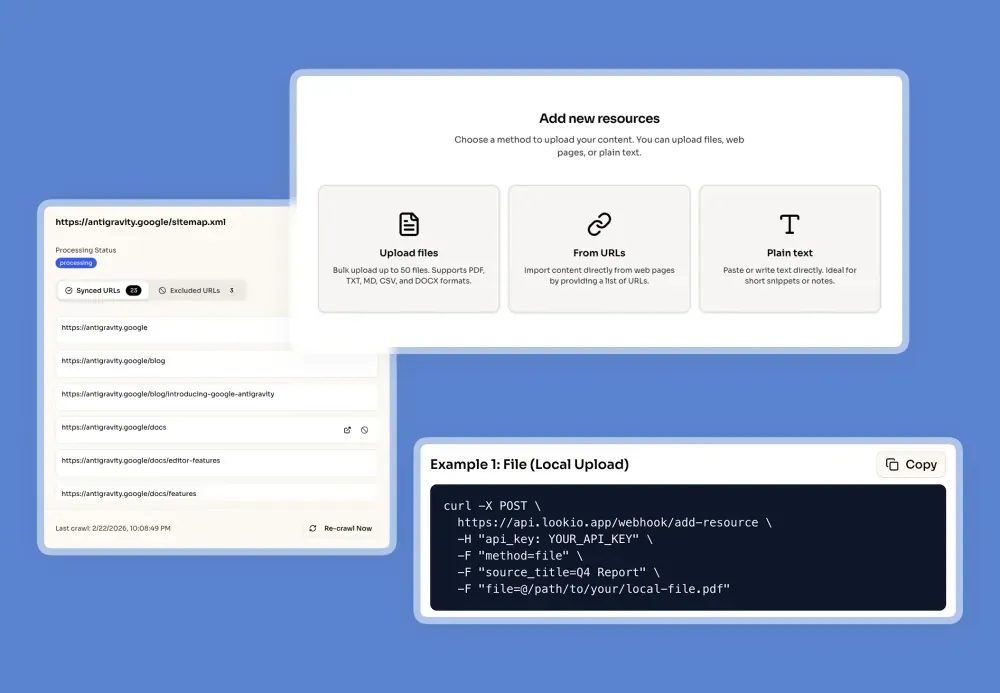
When you upload resources, always attach a clear title and, where possible, a source URL. This enables two things: accurate citations in every answer, and clickable links so users can verify the source themselves.
This one practice converts your assistant from a black box into a transparent, auditable system. It is the single highest-leverage configuration step.
Keep your knowledge base current
Documentation that is six months out of date is not just unhelpful. It is actively harmful, because users trust the answer they receive. Build a maintenance habit into your workflow.
For web-based documentation, the most effective approach is sitemap syncing. Lookio can crawl your website’s sitemap, automatically detect updated pages, and re-ingest them. Your assistants always answer from the current version, with no manual re-upload required.
Configuring your assistant for precision
The second lever for retrieval accuracy, beyond knowledge base structure, is your assistant’s instructions.
Think of the assistant instructions as the system prompt for your retrieval layer. They define not just what the assistant knows, but how it reasons and what it prioritizes.
A few patterns that work:
Be specific about the scope. “Answer questions about our return and refund policy based only on the attached policy documents. If the answer is not in the documents, say so explicitly.” This prevents the model from filling gaps with general knowledge.
Require citations. “Always reference the source document and section in your answer.” This forces the retrieval layer to surface the chunk origin, not just the synthesized answer.
Define the tone for the context. A support assistant should be concise and direct. A sales assistant might be persuasive and include adjacent context. A legal assistant should be conservative and flag ambiguity. Instructions that match the assistant’s role produce answers that match user expectations.
Set a fallback behavior. Tell the assistant explicitly what to do when the answer is not in the documents. The worst outcome is a hallucinated answer. A close second is a vague non-answer. “If the information is not available in the provided documents, respond: ‘I don’t have this information in my current knowledge base. Please contact [team] directly.’” is a better outcome than anything fabricated.
Choosing the right query mode
Lookio offers four query modes, and the choice matters more than most people realize.
| Mode | Credits | Speed | Best for |
|---|---|---|---|
| Eco | 1 credit | ~14s | Bulk, non-urgent lookups |
| Flash | 3 credits | ~8s | Real-time support, routine workflows |
| Europe | 5 credits | ~15s | GDPR-compliant processing (Mistral AI) |
| Deep | 20 credits | ~25s | Complex research, multi-document analysis |
Here is the practical logic for most teams:
Default to Flash. For the majority of queries, whether powering a customer support bot, answering internal team questions, or generating content outlines, Flash mode gives you the right balance of speed and quality. At 3 credits per query and ~8 seconds, it is the workhorse tier.
Switch to Deep for research tasks. When a query requires reasoning across multiple documents (due diligence, compliance analysis, competitive research), Deep mode’s additional retrieval depth earns its cost. The difference in accuracy on complex multi-document questions is meaningful.
Use Eco for batch processing. When you are running hundreds of queries at once from a CSV or an automated pipeline, and speed is not critical, Eco mode keeps costs low without sacrificing correctness for straightforward lookups.
NB: The mistake I see most often is teams that set all their assistants to Deep mode by default, reasoning that “more is always better.” It is not. Overusing Deep mode on simple queries adds cost and latency without improving accuracy. The retrieval precision is the differentiator, not the raw processing depth.
Querying via API, MCP, and CLI
Once your assistant is configured and your knowledge base is structured, the query itself is a single API call.
curl -X POST https://api.lookio.app/v1/query \
  -H "Content-Type: application/json" \
  -H "api_key: YOUR_API_KEY" \
  -d '{
    "query": "What are the key compliance requirements for GDPR data retention?",
    "assistant_id": "YOUR_ASSISTANT_ID",
    "query_mode": "flash"
  }'
The response includes the sourced answer plus the estimated carbon footprint of the query. This same call works inside any automation tool: n8n, Make, Zapier, or a custom backend.
For AI agents, the Lookio MCP server lets Claude, Antigravity, or any MCP-compatible agent query your knowledge base autonomously. The agent decides when it needs information, queries the right assistant, and integrates the answer into its response, without you needing to manually insert context into the conversation.
For headless scripts and CI/CD pipelines, the Lookio CLI with native --json mode gives you clean, machine-parseable output designed for automation:
lookio query "What is the approved vendor list for Q4?" \
  --assistant "YOUR_ASSISTANT_ID" \
  --mode flash \
  --json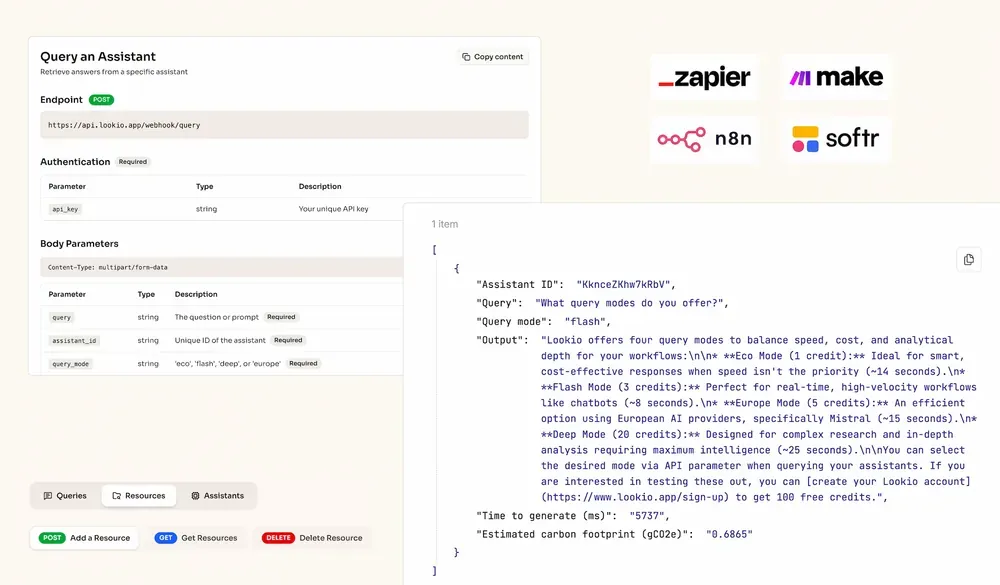
The surface area of where your knowledge base can answer questions is not limited to a chat interface. It extends to every tool in your stack that has an HTTP call.
What good answers look like
A well-configured knowledge retrieval system produces answers with three qualities that are easy to check:
Specificity. The answer references concrete details from a specific document, not vague generalizations. “According to Section 4.2 of the Employee Handbook, remote work requires manager approval for stays exceeding 14 days” is a good answer. “Our remote work policy allows for flexibility based on manager discretion” is a warning sign.
Source attribution. Every factual claim traces back to a document. If the assistant cannot name its source, it is drawing from general knowledge, which is exactly what you are trying to prevent.
Appropriate uncertainty. A well-configured assistant will tell you when it does not know something. Overconfidence is a hallucination symptom. If your assistant always has a confident answer regardless of the question, that is a problem, not a feature.
The compounding return on good documentation
Here is the strategic point underneath the technical detail: the quality of your query results is directly proportional to the quality of your documentation.
Companies that invest in clear, well-structured internal documentation are not just organizing for humans. They are building an asset that scales to AI queries. Every policy document, methodology guide, and expert analysis that is uploaded as a clean resource becomes an automated expert available across the entire business, without interrupting the person who wrote it.
The RAG business use cases are real. But they only compound if the foundation is solid: focused assistants, clean resources with proper metadata, and query modes matched to task complexity.
Most companies have the raw material. The challenge is the architecture that turns documentation into reliable retrieval.
Start building with 100 free credits, no credit card required. Upload your first documents, configure an assistant, and run your first query. The accuracy gap between pasting docs into ChatGPT and querying a structured knowledge base becomes obvious within the first ten queries.
If you want to see it integrated into a real workflow, the n8n template for automated SEO articles and the Q&A chatbot template are both good starting points.