Chat
Ask an assistant in the app, pick a query mode, follow a conversation and see what each answer cost.
In Chat, you ask your assistants questions. It is the quickest way to test a resource and an assistant before you automate anything.
Ask a question
Pick an assistant, write a question and send it. The assistant searches its resources, reads the best passages and writes the answer. The chat shows each phase: searching, reading, answering. The answer appears word by word.
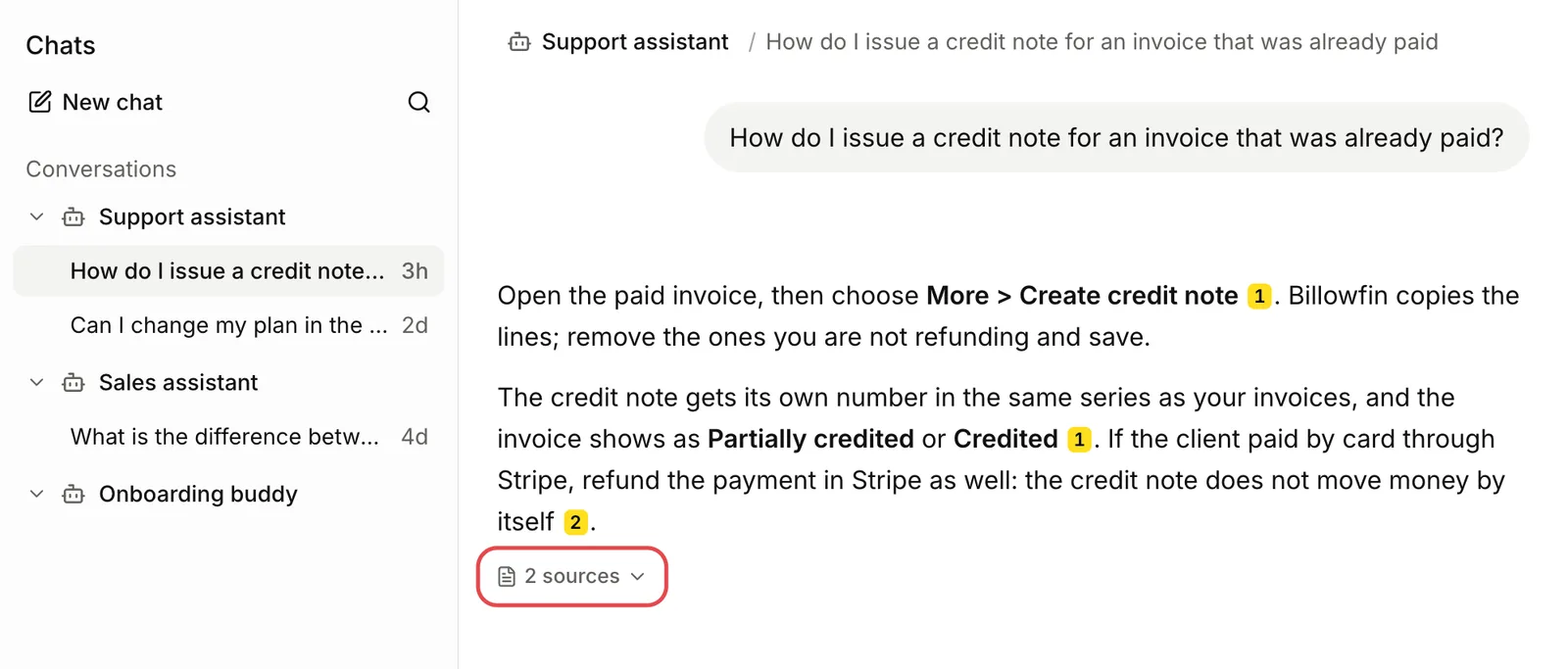
Each number in the answer points to a passage it used. sources under the answer lists them all. See Citations.
Choose a query mode
The Query mode menu sets how Lookio answers and what the answer costs.
| Mode | Credits | Use it for |
|---|---|---|
| Flash | 30 | The default. Fast answers. |
| Eco | 10 | Questions that can wait a little. |
| Deep | 80 | Complex questions with several parts. |
The price is fixed. A long answer or an answer that finds nothing costs the same. Each answer shows its mode, its cost and its duration. See Core concepts.
Conversations
Lookio stores your conversations, grouped by assistant. Only you see them.
Archive or restore a conversation
Archive, in a conversation’s menu, removes it from your list. It keeps the messages. Archived chats opens the archive. Restore brings a conversation back.
Delete a conversation
Delete removes the conversation and its messages permanently. The credits it spent stay in Usage.
- A conversation stays with one assistant. To ask another assistant, start a new chat.
- A follow-up question uses the last six messages as context: three questions and their answers.
- When an assistant is deleted, its conversations move to Deleted assistants. You can read them but not continue them.
- If an admin removes your access to an assistant, you can no longer open its conversations.
When there is no answer
If the resources hold nothing relevant, the assistant says so. The question is charged like any other. You cannot ask an assistant that reads no resource: the chat tells you and sends nothing. If you expected an answer, see Troubleshooting.
Chat from the API
Lookio keeps every API answer in a conversation. Continue it with conversation_id.
- With a personal connection (the CLI after
lookio auth login, or an MCP client), the conversations are your own chats, like in the app. - With an API key, the conversations go to the workspace logs.
See Conversations and end users, Ask an assistant and Streaming.
Install Lookio as an app
You can install Lookio on a computer or a phone. It then opens in its own window, from the Dock, the taskbar or the home screen. It is the same Lookio, always up to date.
Install in Manage account, under App, or the install icon in the address bar.
File, then Add to Dock.
Share, then Add to Home Screen.
Install in Manage account, or Add to Home screen in the browser menu.
Lookio suggests the install from your second visit. Not now hides the suggestion for a week. A second Not now hides it permanently. The button stays in Manage account.